Page 2 of 2
Re: Wireless module!
Posted: Wed Jul 08, 2026 10:15 am
by mnfisher
A first play today....
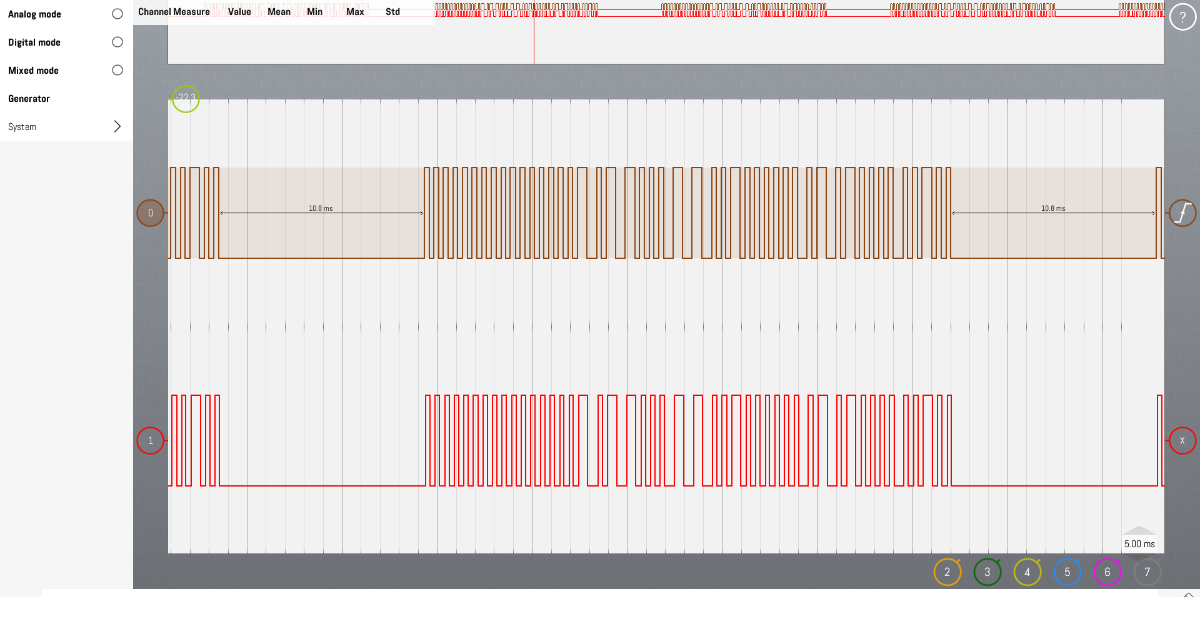
First up - using a UART doesn't work (needs inverting) - so I did a small transmit that uses TMR2 to generate 4000Hz (250uS) timing.
It's a little 'clunky' at present - data is put into 'buf' and 'length' set to it's length (in bits) - the data needs to include the 0xAA or 0x55 AGC bits - but because it is Manchester encoded - this is actually done as 0xFF (two bytes of 0x0b0101010101) or 0x00 (two bytes of 0b10101010) -n encoding gives 0 -> 0b10 and 1 -> 0b01 (which makes decoding the signal easier (maybe))
This doesn't do decoding (yet) - need to pull another Arduino.
This code is Arduino specific (there is a custom interrupt to get a 4kHz timing)
So - something to try out. I found an aerial helped (and I just poked a jumper through the relevant holes - solder later!)
Showing 'sent' and 'received' by connecting the data pins of the transmitter and receiver to a logic analyser (which works better than a scope - the signal is rather noisy)
- LabNation_Screenshot52.png (170.67 KiB) Viewed 11349 times
Martin
Re: Wireless module!
Posted: Wed Jul 08, 2026 4:51 pm
by mnfisher
So - split into two programs - a 'sender' (ASK) and a 'receiver' (ASK_DEC) - I wrote a small macro Send that transmits a string (keep it < 20 characters or so - short messages should work better - I've not tested longer strings, although buf has 128 bytes (and 7 are used for AGC, magic, length, 0 and CRC)) It also adds a checksum - but it is ignored here.
The data send is {0xFF, 0xFF /* Synchronisation / AGC bytes */, 0x2DD4, /* Magic number for transmission */ number_bytes, str_data, CRC }
Note that here I've included the /0 termination character of the string.
The receiver 'looks' for the magic number (this could be tailored for multiple targets) then gets the number of characters to read. Reads 'n' characters - It should calculate the CRC and drop bad blocks. It outputs the string received to UART
It's still rather clunky and there is some extraneous 'debug' code (or not?) - but transmission seems reliable at a few inches distance - someone might like to test over some longer ranges. I'll have to solder the antenna first

If the range is good (enough) then it would be worth continuing and refining - but if it's only a few inches (or feet) then maybe not worth the time?
Martin
Re: Wireless module!
Posted: Wed Jul 08, 2026 7:21 pm
by jgu1
Thank you, Martin.
Could you please explain what I need to do to test it? I would be happy to help with testing.
For me, your program is a little difficult to understand, but I can connect it to two Arduinos and try and test with longer distance it out if you can guide me through the setup.
Re: Wireless module!
Posted: Wed Jul 08, 2026 8:41 pm
by mnfisher
Hi Jorgen,
Thank you - the ASK Arduino needs to be connected to the transmitter. Connect gnd, 5v (or more for longer range up to 12v - proceed with care!) and the data pin to the TX pin (in properties) i used d6...
The ask_dec Arduino connect to the receiver - ground, 5v (max) and data (either pin) to d3.
The receiver also needs to be connected to a pc and open a com port in putty at 115200 baud.
The transmitter sends 'hello world [number]' where number increments and this should be output to putty by the receiver...
I notice there are better quality versions with a crystal rather than a tuned coil..
I found that moving the transmitter to the kitchen meant that reception was poor unless i fiddled with the antenna (which still aren't soldered) i suspect having a rigid vertical antenna should improve things dramatically (instead of the current jumper wire!)
Martin
Re: Wireless module!
Posted: Fri Jul 10, 2026 6:27 pm
by jgu1
Hi Martin, I am a little busy at the monent, perform a test soon, thank´s in advance

Jorgen
Re: Wireless module!
Posted: Sat Jul 11, 2026 2:56 pm
by mnfisher
No worries... I might solder a board up and have a test myself this weekend (although at the moment the sun is shining - soni might be led luted outdoors...)
Martin
Re: Wireless module!
Posted: Sun Jul 19, 2026 10:35 am
by jgu1
Hi again Martin!
Finally, get some time to have a look at your program. Instead of using UART, can I use a I2C Display and I have tryed to connect it in the DEC and is it the correct place I have placed the macro?
Honestly, Martin, I'm not quite able to follow your program (only for hardcore programmer

). In your examble I assume it's a test to see whether it's possible to send and receive data, and I'd be more than happy to test it. However, my goal is to be able to use commands similar in the same way as with a UART component, as shown in the attached picture, so it's easy to choose what to send and receive.
I'm very grateful that you're taking the time to help me. Thank you very much for your support.

UPDATE: I have connected TX and RX I see data comming in on the receiver.
Jorgen
Re: Wireless module!
Posted: Sun Jul 19, 2026 11:06 am
by mnfisher
Hi Jorgen,
Yes - first check it works

As it stands there's is send string, but really it is just sending an array of bytes.
My thoughts were - receiver and transmitter share a magic number so that one transmitter can send to multiple receivers.
What things do you need to transmit - I didn't do a lot of testing, but small 'packets' of data work best (and a checksum would be good)
One issue is that transmission is one way - so the transmitter has no way to know that reception read successful. So should everything send multiple times?
Please to suggest the features you'd like !
Martin
