Page 2 of 2
Re: Update project to F10
Posted: Fri Feb 06, 2026 6:33 am
by Carmelo
chipfryer27 wrote: ↑Thu Feb 05, 2026 10:24 pm
Hi
Opened then saved in v7.
This can now be opened in later versions. As Martin mentions above, you will need to check components etc to ensure things are as they should be.
Regards
Muchas gracias, esta tarde lo descargo y verifico.
C.
Re: Update project to F10
Posted: Fri Feb 06, 2026 6:30 pm
by Carmelo
Downloaded, stolen and working OK.
I have 2 additional questions:
1st.- Can version 10 and version 7 be installed at the same time?
2º.- Where can I download version 7?
C.
Re: Update project to F10
Posted: Fri Feb 06, 2026 6:46 pm
by chipfryer27
Hi
Yes, all versions of Flowcode can exist on the same machine without issue. Although if you install the latest version that then becomes the default (unless you tell Windows otherwise). If you want to open in a previous version, run that version and then open your target file from within.
I can't really comment on purchasing a previous version. If you already own a copy it's a simple matter to download from your account. Matrix would need to advise. Really though the only use now for v7 is conversion of older code and forum members are usually happy to assist.
Regards
Re: Update project to F10
Posted: Sat Feb 07, 2026 12:46 pm
by Carmelo
Thanks for the response.
Now a problem has arisen that I have been observing for a long time and that in this project has occurred again and I don't know why it occurs:
When I have a switch activated at a low level, many times when starting to run the program, in siulation, the first time the state of the switch is read it is never recognized by the state. That is to say, when starting and reading the status when active at a low level, it should read a 1 and yet it remains reading a 0.
For it to work, I have to enhance a pulse and then it always works correctly.
This effect is currently happening to me in the project converted from version 5
What could it be due to?
Re: Update project to F10
Posted: Sat Feb 07, 2026 1:08 pm
by chipfryer27
Hi
Just heading out but try simulating and Step-Thru. Monitor your variable and you will see where the issue lies (hopefully). Note that v11 initialises variable to "0" if you don't.
Regards
Re: Update project to F10
Posted: Sat Feb 07, 2026 5:29 pm
by chipfryer27
Hi
It looks like you are running on the internal oscillator, but have forgotten to include the necessary C-Code to enable such. You can see I have included it in the attached.
I simulated by going to Debug>Step Into.
You will see the C-code circled and I'm monitoring all variables
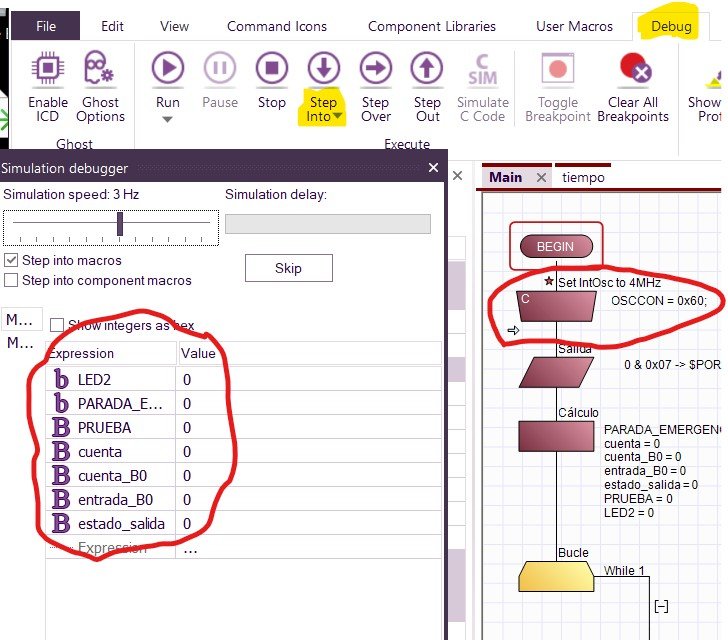
- Screenshot 2026-02-07 170922.jpg (100.28 KiB) Viewed 2623 times
Stepping through on first run, you can see the variable change state correctly.
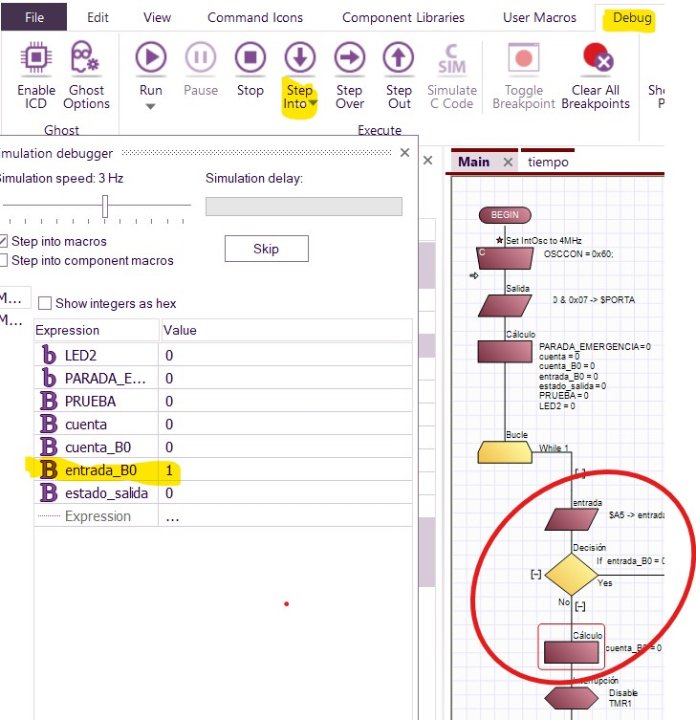
- Screenshot 2026-02-07 171246.jpg (85.52 KiB) Viewed 2623 times
The program stays in that branch until the switch is activated. Note that when you switch, the branch enables a timer interrupt for as long as the switch is activated. Timer interrupts do not simulate very well on a PC as your PC is running far, far faster than 4MHz and your PC is doing a ton of stuff in the background. It should be OK on hardware.
Hope this helps