Page 1 of 1
copy error
Posted: Tue Apr 21, 2026 9:09 am
by SpeedPIC32
I can't copy code pages in Flowcode 11. Is it a settings issue?
Re: copy error
Posted: Tue Apr 21, 2026 9:18 am
by Steve-Matrix
Sorry, but I don't understand. What exactly are you trying to copy?
Re: copy error
Posted: Tue Apr 21, 2026 9:32 am
by SpeedPIC32
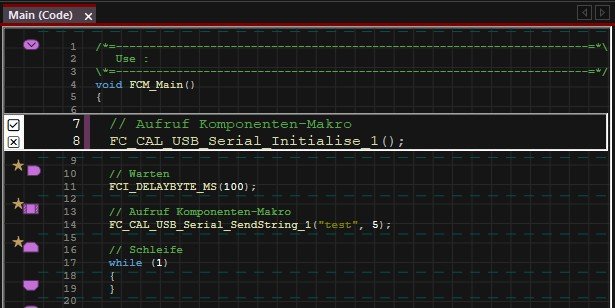
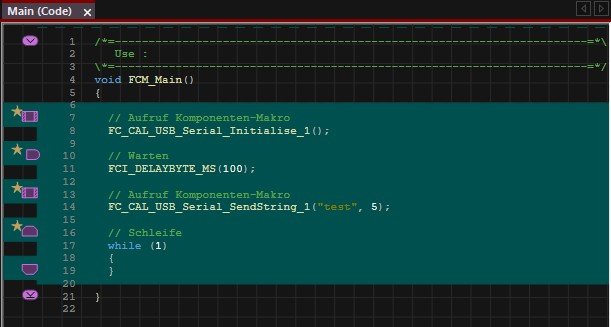
Here’s the thing: for example, I create a new project as a flowchart. Then I can switch the view to the code view. Using Ctrl+A and Ctrl+C, I can copy the content and paste it into Word, for instance. It was working for me until yesterday. Now, when I press Ctrl+A, everything is highlighted in green, and that’s it. I can now only copy individual bits of text like this one: FCV_GV_ADC_RAW_FLOAT = flt_add(flt_add((flt_mul(flt_fromi(FCV_GV_BYTE_HIGH), 65536.0)), (flt_mul(flt_fromi(FCV_GV_BYTE_MID), 256.0))), flt_fromi(FCV_GV_BYTE_LOW));
FCV_OHM = flt_div(FCV_GV_ADC_RAW_FLOAT, 3355.4434);
Translated with DeepL.com (free version)
Re: copy error
Posted: Tue Apr 21, 2026 9:40 am
by SpeedPIC32
Flowcodev11.0.1.14 Pro 19.03.2026
- STRG_C.jpg (42.41 KiB) Viewed 23052 times
- STRG_A.jpg (33.88 KiB) Viewed 23052 times
Re: copy error
Posted: Tue Apr 21, 2026 10:12 am
by Steve-Matrix
Thanks, I see your issue.
In the latest update of Flowcode (v11.0.1), copying icons no longer copies as a text-based format. You can still copy icons and paste them into other flowcharts in Flowcode, but you cannot copy the icon contents directly in a text format for pasting into Word (etc).
However, you can copy the C code text from the Build...View Code menu. This will copy and paste as text.
Re: copy error
Posted: Tue Apr 21, 2026 10:35 am
by SpeedPIC32
That used to be much easier than having to search for that section throughout the entire code.
Could the line numbers at least be numbered consecutively to make searching easier?
It could easily amount to 10,000 lines.
Re: copy error
Posted: Tue Apr 21, 2026 11:37 am
by Steve-Matrix
Thanks for the suggestion - I'll see what we can do to help. Maybe a "show in code window" or "copy as code" menu item would help.
Re: copy error
Posted: Tue May 12, 2026 12:05 pm
by SpeedPIC32
Hi Steve,
Have you come up with a solution yet?
Re: copy error
Posted: Tue May 12, 2026 6:20 pm
by Steve-Matrix
I will hopefully have a solution for this in the next release.
Re: copy error
Posted: Wed May 13, 2026 10:26 am
by Steve-Matrix
For info, in the next release you will be able to copy Flowcode commands as icons. And if the commands are in a Code or Pseudocode view, the text will be what you can see in that view (i.e. C code or pseudocode).