Page 1 of 1
Free Target E-Blocks2 STARM Programmer failing to compile in FC11 Free Version
Posted: Tue Jun 16, 2026 6:24 pm
by Bijumon
Hi team,
I am having an issue, compiling project in the Flowcode 11 Free Version using the free target E-Blocks2 STARM Programmer.
it fails to compile and displays the following error message.
"You do not have a valid licence to perform this action"
further, I noticed that under the Project Options, the selected target is automatically highlighted as the BL0061 instead of the E-Blocks2 STARM Programmer. which seems to be triggering the licensing error.
Could you please look into this?
Regards,
Re: Free Target E-Blocks2 STARM Programmer failing to compile in FC11 Free Version
Posted: Wed Jun 17, 2026 9:35 am
by Steve-Matrix
Thanks for letting us know. We will get a fix out for this today.
In the meantime, you could use the attached FCD instead. Put it into the following folder while Flowcode is not running:
Code: Select all
%PROGRAMDATA%\MatrixTSL\FlowcodeV11\FCD\ARM
When you try to compile, you may need to re-target your project to the "E-Blocks2 STARM Programmer".
Re: Free Target E-Blocks2 STARM Programmer failing to compile in FC11 Free Version
Posted: Fri Jun 19, 2026 7:01 pm
by Bijumon
Hi Team,
Thank you for the quick fix on the subject! The latest update is compiling the project without any errors.
Just to clarify my setup: I am not using real hardware yet. I am simulating the project in Proteus using the .hex file generated by Flowcode.
While testing, I noticed a couple of issues with the native components.
First I made a simple LED blink program, but the proteus simulation freezes whenever it hits delay.
However, when I use HAL_Delay(); inside a C code block instead, it works perfectly in the Proteus simulation.
Next I tried using the Flowcode PWM component, but it won't work in the Proteus simulation.
Just like before, when I bypass the component and use the HAL Code inside a C block, the PWM works perfectly on the proteus simulation oscilloscope.
can you please look into this.
Thanks again for your support!
Best regards,
Re: Free Target E-Blocks2 STARM Programmer failing to compile in FC11 Free Version
Posted: Sun Jun 21, 2026 9:12 am
by LeighM
This sounds like wrong project or component settings. Clock speeds for example. Because delays and PWM definitely do work.
I'm not in a position to check your settings at the moment.
It looks like you have posted your HAL code version?
Perhaps if you post your Flowcode native version someone may be able to help.
I suggest you try starting with the LED flash test on hardware.
Re: Free Target E-Blocks2 STARM Programmer failing to compile in FC11 Free Version
Posted: Sun Jun 21, 2026 11:30 am
by Bijumon
Hi team,
Thank you for the response and the suggestions.
I am currently testing the generated .hex files inside Proteus simulation before moving the project to physical hardware.
I am experiencing issue between two different compilation approaches. Both versions compile to a .hex file without any errors, but their proteus simulation behaviors are completely different.
When I use custom C-blocks to configure the registers directly for the PWM and Delay (while keeping the visual LED components and Calculation icons native to Flowcode), the generated .hex file simulates perfectly in Proteus.
When I try to achieve the exact same logic using native Flowcode components and standard icons for the PWM and Delay, the generated .hex file fails to work in proteus simulation.
Since the project settings are identical between both versions.
I have attached both .fcfx project files for comparison.
Thanks again for your support!
Re: Free Target E-Blocks2 STARM Programmer failing to compile in FC11 Free Version
Posted: Mon Jun 22, 2026 9:13 am
by Steve-Matrix
Bijumon wrote: ↑Sun Jun 21, 2026 11:30 am
I am currently testing the generated .hex files inside Proteus simulation before moving the project to physical hardware.
One problem with this approach is you will not know if the issue is caused by an error in the Flowcode project or an error in the simulation within Proteus. Only when you have downloaded to real hardware will this be resolved.
But even if the issue is with the Flowcode code generation, it looks like you have a suitable workaround using C code. So I think you should be able to proceed with your project.
Re: Free Target E-Blocks2 STARM Programmer failing to compile in FC11 Free Version
Posted: Tue Jun 23, 2026 7:41 pm
by LeighM
Could it be the e-blocks2 port remapping that is causing confusion?
Re: Free Target E-Blocks2 STARM Programmer failing to compile in FC11 Free Version
Posted: Wed Jun 24, 2026 1:31 pm
by BenR
Thanks Leigh, Yes could well be the cause.
Here's the remapping guide for the E-block board from ST Port pins to E-blocks Port Pins if it's useful.
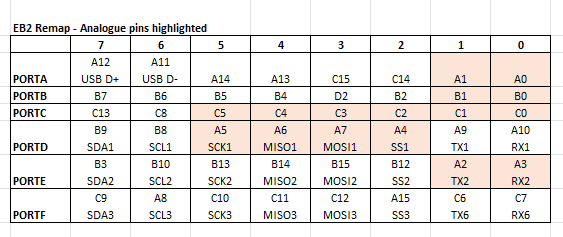
- Screenshot 2026-06-24 133014.png (19.23 KiB) Viewed 7158 times
Re: Free Target E-Blocks2 STARM Programmer failing to compile in FC11 Free Version
Posted: Wed Jun 24, 2026 7:06 pm
by Bijumon
Hi everyone,
Thanks for all the support.
I have verified the pin mappings for my setup PWM Channel 5 (TIM2_CH1) on PORTD5 of the E-blocks board correctly maps to PA5 on the controller, and E-blocks PORTA0 (my LED pin) maps to PA0. This completely matches the E-blocks pin mapping guide.
Next I try using the Flowcode UART component, the Proteus Virtual Terminal prints garbage characters. Looking closer at the Proteus UART debug log, I noticed baud rate mismatch while my Flowcode component properties are set to 9600 Baud, Proteus reports the simulated hardware is actually running at 2500 Baud.
Then I bypass the PLL entirely and change all internal clock configurations to a flat 16 MHz (SYSCLK, HCLK, APB1, and APB2), Then Virtual Terminal prints perfectly and Proteus UART debug log reports UART running at 9600 Baud.
Unfortunately, even with this change, the Delay icon and PWM components still do not function correctly.
It could be the Proteus simulation model issue, but I don't have the physical hardware on hand to verify it yet.
C code works perfectly at the maximum 84 MHz PLL speed.
Thanks again for your support....
Re: Free Target E-Blocks2 STARM Programmer failing to compile in FC11 Free Version
Posted: Mon Jun 29, 2026 6:34 pm
by LeighM
Hi,
I've just had chance to look at your projects and their settings.
You have PLL selected as system clock, but PLL source is set to OFF
Please change PLL source to HSI
With these settings your system clock and timer clocks will be 48MHz
You have correctly set the Flowcode project clock speed to 16MHz
but unfortunately this clock rate (16 rather than 48) is used for the helper calculating the PWM frequency
so you will need to manually adjust the period overflow value in order to get the correct frequency.
As mentioned previously it would be best to test on actual hardware.
Hope that helps.