Using ReadAsInt
and Humidity variable as an Byte (saves ROM).
Within a calculation box:
HUMIDITY = ADC1_VALUE * 7 / 50 + 5
Martin
Search found 9 matches
- Sun Jul 13, 2014 3:56 pm
- Forum: Components (Other)
- Topic: Connecting a alphanumeric LCD to Flowcode
- Replies: 71
- Views: 105331
Re: Connecting a alphanumeric LCD to Flowcode
can you explain why use this formula
- Sun Jul 13, 2014 3:00 pm
- Forum: Components (Other)
- Topic: Connecting a alphanumeric LCD to Flowcode
- Replies: 71
- Views: 105331
Re: Connecting a alphanumeric LCD to Flowcode
Hi Martin
I used Floating point variable (HUMIDITY)
ADC1_VALUE (integer)
look that
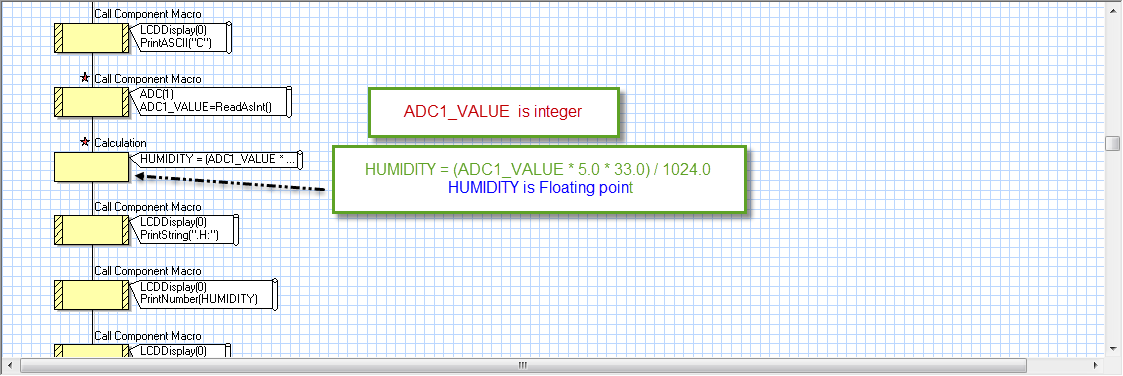
and the character of sensor is
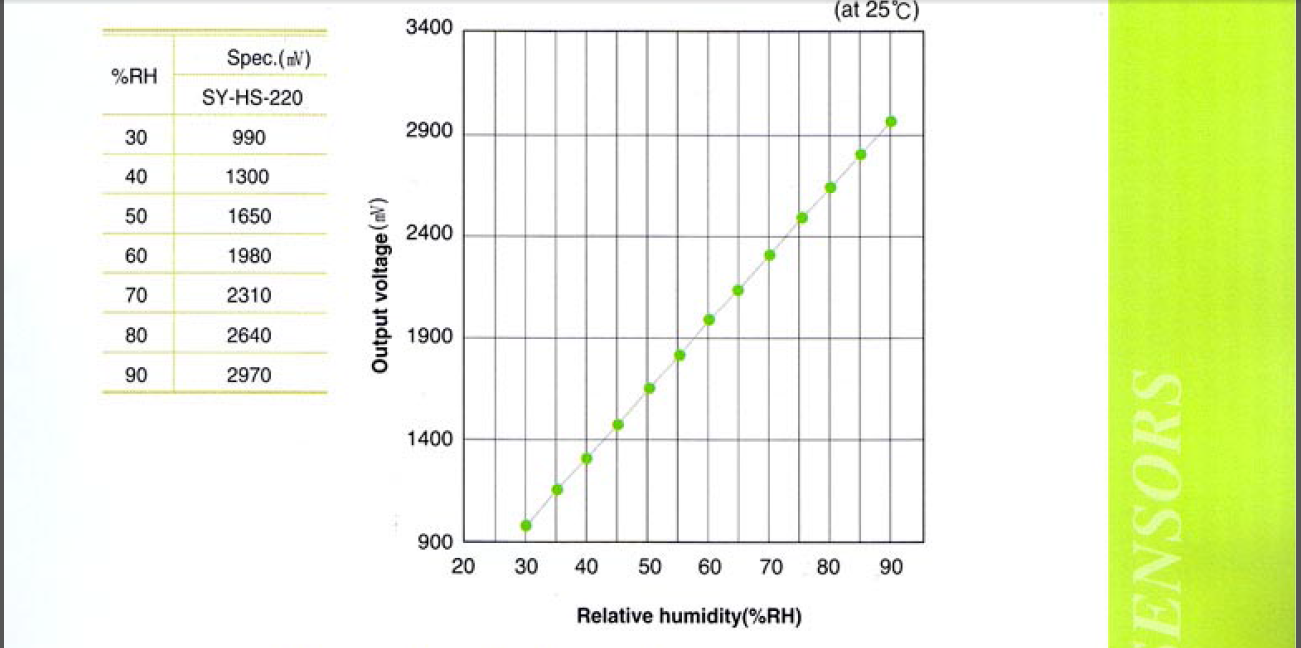
I used Floating point variable (HUMIDITY)
ADC1_VALUE (integer)
look that
and the character of sensor is
- Sun Jul 13, 2014 1:53 pm
- Forum: Components (Other)
- Topic: Connecting a alphanumeric LCD to Flowcode
- Replies: 71
- Views: 105331
Re: Connecting a alphanumeric LCD to Flowcode
Thank you Martin
yes I should use pull down resistors
can you help me
I use SY_HS_220 Humidity sensor
PIC16f877A : ADC(1) for humidity sensor
ADC1_VALUE:ReadAsInt()
HUMIDITY = (ADC1_VALUE * 5.0 * 33.0) / 1024.0
in data sheet of sensor the output voltage is 2970mv for 90%RH
And 990mv for 30%RH ...
yes I should use pull down resistors
can you help me
I use SY_HS_220 Humidity sensor
PIC16f877A : ADC(1) for humidity sensor
ADC1_VALUE:ReadAsInt()
HUMIDITY = (ADC1_VALUE * 5.0 * 33.0) / 1024.0
in data sheet of sensor the output voltage is 2970mv for 90%RH
And 990mv for 30%RH ...
- Sat Jul 12, 2014 12:42 pm
- Forum: Components (Other)
- Topic: Connecting a alphanumeric LCD to Flowcode
- Replies: 71
- Views: 105331
Re: Connecting a alphanumeric LCD to Flowcode
Hi Martin
yes it is working but there is another problem when i want use keypad it is take number without press any key ( the connection of keypad is c1:PortD4
c2:PortD5
c3:PortD6
rowA:portC4
rowB:PortC5
rowC:PortC6
rowD:PortC7)
I connect terminal of keypad without resistor between them and pins of ...
yes it is working but there is another problem when i want use keypad it is take number without press any key ( the connection of keypad is c1:PortD4
c2:PortD5
c3:PortD6
rowA:portC4
rowB:PortC5
rowC:PortC6
rowD:PortC7)
I connect terminal of keypad without resistor between them and pins of ...
- Fri Jul 11, 2014 8:32 pm
- Forum: Components (Other)
- Topic: Connecting a alphanumeric LCD to Flowcode
- Replies: 71
- Views: 105331
Re: Connecting a alphanumeric LCD to Flowcode
Thank you Martin
- Thu Jul 10, 2014 11:16 pm
- Forum: Components (Other)
- Topic: Connecting a alphanumeric LCD to Flowcode
- Replies: 71
- Views: 105331
Re: Connecting a alphanumeric LCD to Flowcode
Thank you Martin
I check circuit no short or open circuit and the Flowchart chip configuration is right (0x393A) and another
look these photos http://cdn.top4top.net/i_897b2f8ac91.png
this configuration in Topwin 2005 programmer
http://cdn.top4top.net/i_897b2f8ac92.png
and the simulation run ...
I check circuit no short or open circuit and the Flowchart chip configuration is right (0x393A) and another
look these photos http://cdn.top4top.net/i_897b2f8ac91.png
this configuration in Topwin 2005 programmer
http://cdn.top4top.net/i_897b2f8ac92.png
and the simulation run ...
- Thu Jul 10, 2014 5:14 pm
- Forum: Components (Other)
- Topic: Connecting a alphanumeric LCD to Flowcode
- Replies: 71
- Views: 105331
Re: Connecting a alphanumeric LCD to Flowcode
Hi everybody
I face problem with LCD it's just light and don't display any char
I am use Pic16f877a with config word 0x393a
simulation ok but when I run my device that's what happen
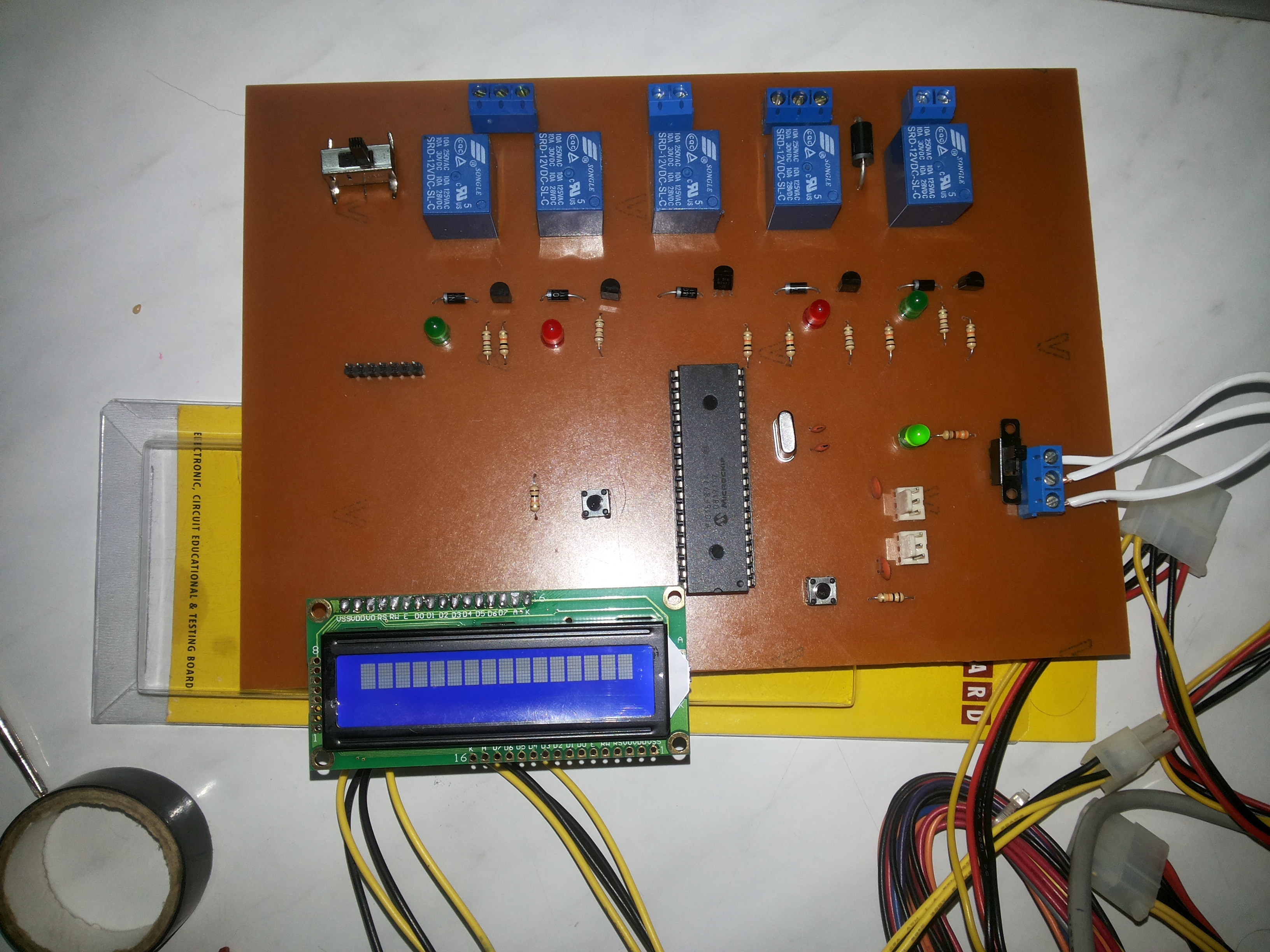
I face problem with LCD it's just light and don't display any char
I am use Pic16f877a with config word 0x393a
simulation ok but when I run my device that's what happen
- Fri Jul 04, 2014 11:50 pm
- Forum: General / Misc
- Topic: Watch out for Stack Overflow in FlowCode
- Replies: 21
- Views: 37837
Re: Watch out for Stack Overflow in FlowCode
Thank you Martin
The code failure to compile after put software stack instruction
but i solved problem by modify the code to avoid stack overflow
the simulation for this code on flowcode fin but it doesn't work in proteus 8 and when implementation on hardware
the config word for PIC16f877A in my ...
The code failure to compile after put software stack instruction
but i solved problem by modify the code to avoid stack overflow
the simulation for this code on flowcode fin but it doesn't work in proteus 8 and when implementation on hardware
the config word for PIC16f877A in my ...
- Fri Jul 04, 2014 1:24 pm
- Forum: General / Misc
- Topic: Watch out for Stack Overflow in FlowCode
- Replies: 21
- Views: 37837
Re: Watch out for Stack Overflow in FlowCode
Hello
I have the same trouble in 16F877A
Serious Warning: Call stack usage exceeds:8!
Where & How I should put
ChipName=16F877A
ExtraLinkerParams=-swcs 6 2 ??
I Couldn't Open 16f877A.fcd
Thanks
I have the same trouble in 16F877A
Serious Warning: Call stack usage exceeds:8!
Where & How I should put
ChipName=16F877A
ExtraLinkerParams=-swcs 6 2 ??
I Couldn't Open 16f877A.fcd
Thanks