Page 2 of 2
Re: Read momentary switch state - press and press again must be On / Off
Posted: Sat Aug 03, 2019 5:27 pm
by medelec35
Frank607 wrote:I see that the LEDs are going On when I push a button. My relays are on PORTC and I don’t know how I can activate them in your flowchart.
Oh, I understand now.
I have modified the flowchart so you can assign multiple outputs to each switch.
Not sure in hardware why you would not have just one output pin for each switch and connect both relays and one LED to the it.
Excessive current will not be drawn as transistors can be used to enable both relays and LEDs on the one pin.
Re: Read momentary switch state - press and press again must be On / Off
Posted: Sat Aug 03, 2019 6:28 pm
by Frank607
Hi Martin,
I have test your updated flowchart and it is working perfect !

|I have on this PCB 2x ULN2803 transistor arrays. But to keep it flexible with the existing HCS361 remote keys I need this flexibility.
I understand now much more easier the flowchart.
Many thanks for helping me out. I think I don’t need it but I have just bought the update from V7 to V8, just to support the
whole FlowCode team. I said It before; Keep on this road !
Attached a picture from the HCS512 Decoder PCB.
Thanks,
Frank
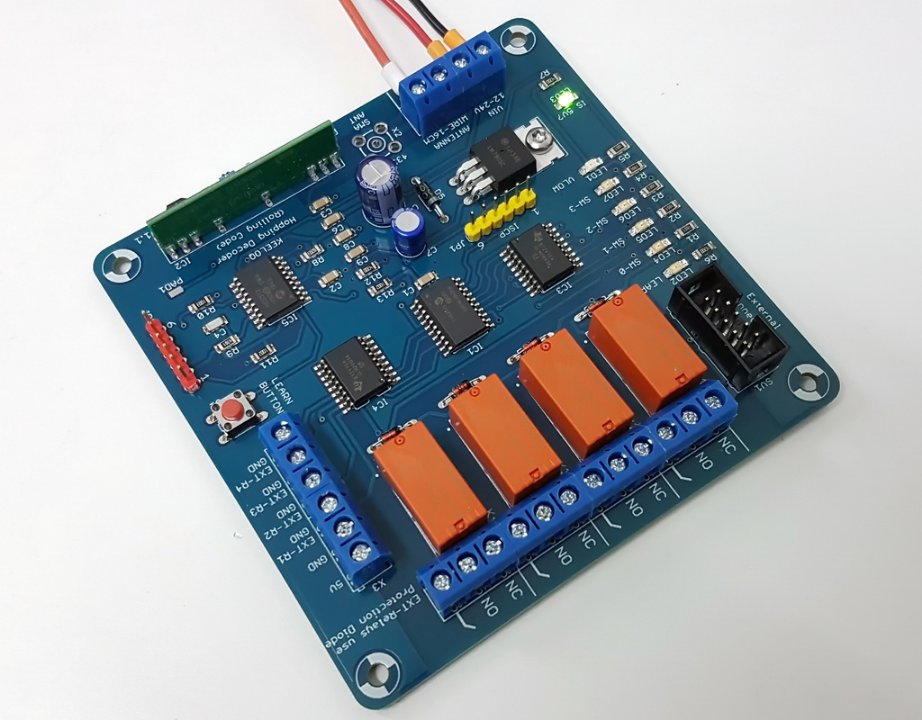
- 2019-08-03 19.21.48.jpg (115.08 KiB) Viewed 4674 times
Re: Read momentary switch state - press and press again must be On / Off
Posted: Sat Aug 03, 2019 6:40 pm
by medelec35
Hi frank,
Glad the Flowchart works ok.
Board looks good.
Out of curiosity, What PCB package did you use?
V8 is great, worth using if you have both V7 & V8.
Thanks for keeping us updated.
Re: Read momentary switch state - press and press again must be On / Off
Posted: Sat Aug 03, 2019 6:57 pm
by Frank607
medelec35 wrote:Hi frank,
Out of curiosity, What PCB package did you use?
The PCB design software is Eagle 7.7. I’m not going higher because of the acquisition from CadSoft by Autodesk with their monthly abonnements. I hate this. For routing I use Electra Autorouter, very efficient and also no monthly abonnements. Greate tool to have.
Hint: I really hope that FlowCode also will not go to a abonnement per month.
Re: Read momentary switch state - press and press again must be On / Off
Posted: Sun Aug 04, 2019 1:03 am
by medelec35
I like using Kicad as its free with unlimited pins,layers and board size.
V5 is good improvement on V4
I like you way you assign the foot prints to the symbols.
That means you don't have to delete the schematic schematic symbol to easily change the footprint.
A disadvantage is it has not got a built -in auto router anymore.
I Don't blame you for not wanting to pay a monthly subscription, I would not want to either.