Page 1 of 2
serial USB doesn't start
Posted: Sun Jan 15, 2012 9:31 pm
by jadiflow
Hi,
I'm working on a project with an EICO28 which should send data via an USB serial link to a PC running W7 64 bit. Flowcode is 4.5.
The first time I compiled to chip and connected the EICO28, the W7 hardware wizzard opened and I sucessfully installed the Flowcode-generated driver.
In the W7 device manager I see the decive, COM6 in my case, but there is an error: the '!' is displayed on the device entry, and in the device properties it says: 'Device cannot start (error 10)'.
Pressing the reset button on the EICO28 or unplugging and re-plugging the USB cable causes the device manager to refresh but COM6 remains with the error, even if the cable is disconnected!
Don't know whether it is connected but re-compiling the project at the end of the link etc cycle I get the message 'EICO not found' and the window opens asking to connect or press the reset button. When I do that there is some reaction, result code = 0 (which I assume means no error) but it all seems a bit flaky...
what did I do wrong?
Thanks for any pointers,
jan didden
Re: serial USB doesn't start
Posted: Sun Jan 15, 2012 11:49 pm
by kersing
Hi Jan,
jadiflow wrote:In the W7 device manager I see the decive, COM6 in my case, but there is an error: the '!' is displayed on the device entry, and in the device properties it says: 'Device cannot start (error 10)'.
Pressing the reset button on the EICO28 or unplugging and re-plugging the USB cable causes the device manager to refresh but COM6 remains with the error, even if the cable is disconnected!
I've seen this happen when the code in the PIC does not respond in a timely manner to USB requests. This can be caused by code taking too many cycles before USB gets serviced. It confuses windows (not only W7). The only reliable way I found to resolve this was to reboot the windows system after fixing the flowchart. Send me a PM with your code if you want me to take a look at it...
jadiflow wrote:
Don't know whether it is connected but re-compiling the project at the end of the link etc cycle I get the message 'EICO not found' and the window opens asking to connect or press the reset button. When I do that there is some reaction, result code = 0 (which I assume means no error) but it all seems a bit flaky...
This is perfectly normal behavior. To load new code ECIO needs to be running the boot loader. This loader is running for a few seconds after reset. If during those seconds no communication attempt is made by the programming software the user application is started.
Regards,
Jac
Re: serial USB doesn't start
Posted: Fri Jan 27, 2012 12:57 pm
by jadiflow
've seen this happen when the code in the PIC does not respond in a timely manner to USB requests. This can be caused by code taking too many cycles before USB gets serviced. It confuses windows (not only W7). The only reliable way I found to resolve this was to reboot the windows system after fixing the flowchart. Send me a PM with your code if you want me to take a look at it...
I am assuming that a rudimentary app with only the USB init macro should work and that with the driver installed there would be no COM port errors?
jan didden
Re: serial USB doesn't start
Posted: Fri Jan 27, 2012 1:27 pm
by jadiflow
Took the serial demo (which uses a 40-pin device), deleted all LCD stuff as I only have an EICO28.
Since you for some reason can't configure that example, started a new flowchart for EICO28 and copied the example code in it.
I generated the driver, installed it and got the message 'can't start this device'.
When I plug the EICO in the PC, it comes up in the device manager, then disappears with 'device not connected, error 45'.
I've been trying to get a simple serial USB device connected for a week now and I'm getting pretty frustrated - it's not like I'm trying to land a probe on Mars.
Can anybody help me here or at least give some tips?
I've tried using the 'enumeration wait' in the external properties. Not sure what it does - the Help basically uses the same words as the dialog so isn't really a help. Why and because of what would you use enumeration wait?
jan didden
Re: serial USB doesn't start
Posted: Fri Jan 27, 2012 2:02 pm
by Benj
Hello Jan,
I seem to remember having this issue but I can't remember what was causing the issue. I did solve it in the end and I seem to remember it was a 'DOH' moment.
What OS are you using?
Are you powering any other circuitry other then the ECIO at the moment?
Are you running interrupts on your ECIO?
Have you tried a very basic test program?
Enumeration wait is a way of getting the microcontroller to either wait for the USB connection forever, i.e. holding up your program until the USB is connected and the device driver installed or wait for a period of time and then bail out and allow the program to run without USB functionality. This allows for devices to work when USB connectivity is and isn't available using a single program.
Re: serial USB doesn't start
Posted: Sat Jan 28, 2012 10:27 am
by jadiflow
Hello Ben, thanks for the reply.
I am running W7 64bit. There's nothing else on the external USB port(s) when I try this.
It's just the EICO module, nothing else.
The program consists of just one macro, the USB serial init.
Any ideas what I can do to fix this?
Another Q: what is the significance of the LED on the EICO flashing (or not)?
Thanks for the enumeration explanation - perhaps plug that in the help file for next release

jan
Re: serial USB doesn't start
Posted: Sat Jan 28, 2012 11:01 am
by kersing
Hi Jan,
A flashing led signals the ECIO is running the USB bootloader.
When you power on or reset the ECIO the first few seconds it runs the bootloader. While the bootloader is running flowcode (ECIOprog is the program doing it) can send new code to the chip. Once the code had been updated or a few seconds have passed without activity from flowcode the bootloader starts the user program. If an attempt to update the user code is unsuccessful for some reason the bootloader will stay active (even after reset) until new code has been transfered successfully.
As the led is connected to RA5 (on ECIO28P, RE2 for ECIO40P) your own software can control it as well.
Regards,
Jac
Re: serial USB doesn't start
Posted: Sat Jan 28, 2012 2:46 pm
by medelec35
Hi jan,
I got my ECIO 28 pin out for the very first time today (always used EB006), so I'm definitely not an expert with it.
But I did get it communicating with hyperterminal, and successfully sending a repeating text message.
What I would try if I was you, is
1)connect up your ECIO to USB, When you will get the port showing up in Device Manager with Flowcode USB serial (COMx ) and right click on the COMx. and select uninstall.
There should be a box for Delete software driver for this device, that needs to be selected.
If successful then you should have in 'Other Devices' 'Flowcode USB serial'
2) Load attached flowchart and generate a new USB driver inf by the usual 'External properties' of serial USB and Generate Driver File. Save file to a folder of your choice but preferably a new empty folder.
3) Compile Flowchart to Chip and press button when device not found etc.
4) Right click on Flowcode USB serial in device manager and select update Driver Software. Browse to where the new generated inf file is located, then click next.
You should get the usual 'Windows can't verify the publisher' etc. Select install anyway
After installed See if that sorts issue out. If is does then use your comms software like hypertermal set to 9600 baud rate and you should get a message displayed.
I did on my PC.
As for the green flashing LED. I would like to add: It also it can also occur if no ECIO drivers have been installed, or corrupted etc.
Hope this helps.
Martin
Re: serial USB doesn't start
Posted: Thu Feb 02, 2012 4:38 pm
by jadiflow
Hi Martin,
The plot thickens.
I cannot even get the first step in your recommended procedure.
If I uninstall the USB serial, it indeed shows up in other devices but as 'Unknown Device'.
What bothered me was that when I attempt to install the driver, and point to the folder with the .inf , Windows never recognized it and said 'driver not found'.
However, if I ask it to list compatible devices, select USB serial, 'have disk' and then point it to the .inf , I get an error:
"The folder you have specified doesn't contain a compatible software driver for your device. If the folder contains a driver, make sure it is designed to work with Windows for x64 based systems."
So it seems that this auto-generated driver is incompatible with my Windows7-64bit.
What system are you using with this?
jan
Re: serial USB doesn't start
Posted: Thu Feb 02, 2012 4:47 pm
by jadiflow
Update: the error I mentioned above is when I attempt to manually install the Flowcode-generated driver for a 'Universal serial controller'.
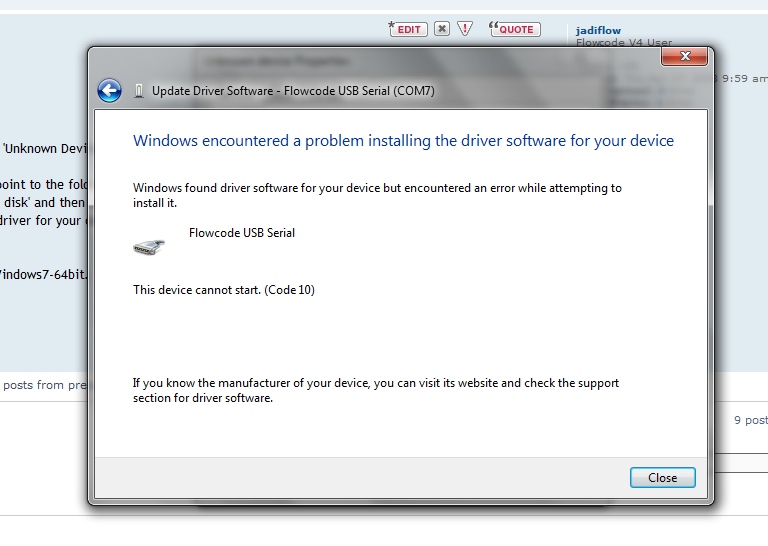
When I attempt to install it for a COM port, I get a list including Matrix MultiMadia, then select "Flowcode Serial USB' then navigate to the .inf and ask it to install that one, I get this error screen:
jan
- mmm-1.jpg (88.31 KiB) Viewed 15236 times
Re: serial USB doesn't start
Posted: Thu Feb 02, 2012 6:30 pm
by Benj
Hello Jadiflow,
Can you post up your program and I will give it a gho on our hardware here. I seem to remember my problem was due to the fact I had changed the rx/tx buffer sizes to an incompatible value.
Re: serial USB doesn't start
Posted: Thu Feb 02, 2012 7:34 pm
by medelec35
I'm running 64bit windows7.
Not too sure how the drivers are generated, i.e unique to your own PC or not, So just in case it's not here is the usb driver I generated.
It may not work for you though.
Martin
Re: serial USB doesn't start
Posted: Mon Feb 06, 2012 10:21 am
by jadiflow
Hi Ben,
See attached. I doubt it's the app because as you can see in the previous attachment, the problems appears (or so it seems) during installation of the driver.
thanks for your help,
jan
Benj wrote:Hello Jadiflow,
Can you post up your program and I will give it a gho on our hardware here. I seem to remember my problem was due to the fact I had changed the rx/tx buffer sizes to an incompatible value.
Re: serial USB doesn't start
Posted: Mon Feb 06, 2012 10:37 am
by jadiflow
Martin, my driver is identical to the one you attached, character by character.
I also verified if I have the usbser.sys driver on my system and it is.
jan
medelec35 wrote:I'm running 64bit windows7.
Not too sure how the drivers are generated, i.e unique to your own PC or not, So just in case it's not here is the usb driver I generated.
It may not work for you though.
Martin
Re: serial USB doesn't start
Posted: Tue Feb 07, 2012 3:22 pm
by Benj
Hello,
Just given it a go here and its working great for me on a win 7 32-bit PC.
One thing you could try is slightly adjusting the PID value in the USB comp properties and then re-generating the driver. Maybe the current PID is causing the issue if your PC has already associated this with something else though this is unlikely.
USB drivers generated from Flowcode are not unique to your PC and should allow the device to run on any Windows PC.
Re: serial USB doesn't start
Posted: Sun Feb 12, 2012 12:57 pm
by jadiflow
Just to exclude anything wrong with my particular EICO unit or compilation/programming setup:
Can someone please look atv these screen shots from 'Compiling to Chip'.
This is with the EICO connected. At the end (screen eico-1) the message appears to press the button on the EICO.

- eico-1.jpg (107.11 KiB) Viewed 15060 times
Re: serial USB doesn't start
Posted: Sun Feb 12, 2012 12:59 pm
by jadiflow
Then I press the button on the Eico and the next screen appears:
The next screen then appears (eico-2):
- eico-2.jpg (66.06 KiB) Viewed 15059 times
Re: serial USB doesn't start
Posted: Sun Feb 12, 2012 1:00 pm
by jadiflow
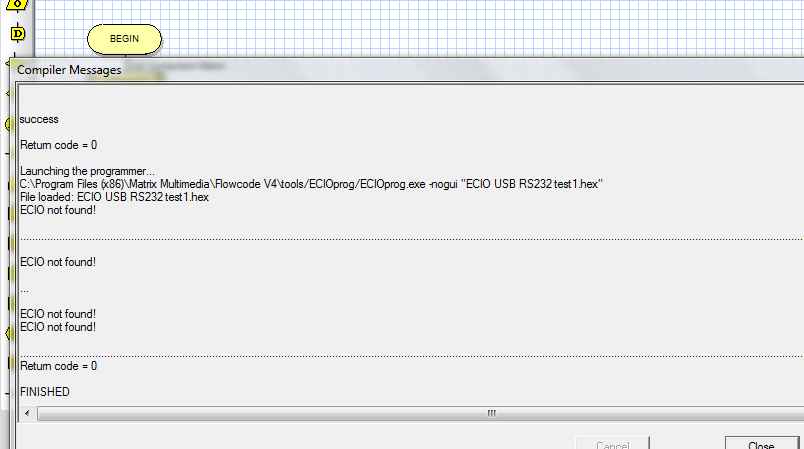
After that, I click 'Cancel' on the message box, and the eico-3 screen below appears.
You see that there are several lines 'eico not found!'.
This may be perfectly normal, I don't know, but it would be nice if someone can confirm or otherwise whether this all looks normal.
thanks very much,
jan didden
- eico-3.jpg (25.77 KiB) Viewed 15059 times
Re: serial USB doesn't start
Posted: Sun Feb 12, 2012 2:41 pm
by kersing
Jan,
This is not normal. You should never have to press cancel. Once the programmer detects the ECIO the window will disappear by itself.
Regards,
Jac
Re: serial USB doesn't start
Posted: Sun Feb 12, 2012 2:54 pm
by kersing
Jan,
A successful sessions looks like this:

- ecio-prog.JPG (107.26 KiB) Viewed 15055 times
After choosing "Compile to Chip" I only hit the reset button on the ECIO. At that moment the highlighted lines (bottom of the window) appeared.
Regards,
Jac
Re: serial USB doesn't start
Posted: Mon Feb 13, 2012 2:29 pm
by Benj
Hello,
Yes Kersing is correct, It looks like the device drivers for the ECIO are not installed or you are experiencing the Windows power down issue. Therefore your program is not making it onto the ECIO.
Re: serial USB doesn't start
Posted: Fri Feb 17, 2012 2:05 pm
by jadiflow
OK, great, at least we have something to work on!
Q:
1 - Is it possible that there is an error or something wrong with the EICO itself?
2 - How do I check if the EICO device driver is installed (I presume you mean the Flowcode EICO device driver). Where is this driver found?
jan
Re: serial USB doesn't start
Posted: Fri Feb 17, 2012 2:34 pm
by jadiflow
OK. Found and downloaded the EICO driver package.
There are three executables in the package:
Matrix_EICO_Driver_Install (amd64).exe;
When running, this gives the error:
'DPInst does not execute on your current Operating System'
Matrix_EICO_Driver_Install (ia64).exe;
When running, this gives the error:
'Not compatible with .....'
Matrix_EICO_Driver_Install (amd64).exe;
When running, this gives the error:
'DPInst does not execute on your current Operating System'
My operating system is W7 Home Premium.
Now what?
jan
Re: serial USB doesn't start
Posted: Fri Feb 17, 2012 2:40 pm
by jadiflow
Update:
The driver install DOES run in Vista compatibility mode.
Installed, and now EICOprog.exe recognises the EICO.
Seems fixed.
Wow......
BTW Is there a driver update for W7 available that I missed?
jan
Re: serial USB doesn't start
Posted: Fri Feb 17, 2012 4:50 pm
by Benj