Page 1 of 1
Activate PIC program
Posted: Mon Nov 26, 2012 8:01 am
by JLeith
Hello all,
Well I'm almost ready to program my PIC. I just came to a pothole in my thought process on how do I activate the PIC programming once it has been introduced to my complete project.
I know as I have been developing my Scoreboard PIC software I just press the button in Flowcode so know when I load the PIC how will it know to start as such ?
Do I need to program a Port to go High and then it runs ? I just don't see the starting point.
John
Re: Activate PIC program
Posted: Mon Nov 26, 2012 10:50 am
by JonnyW
Hello.
What are you using for your hardware - Eblocks or custom hardware?
Either way, the typical action is that whenever the PIC is powered on, it starts executing whatever program is in memory. When it comes to program the chip is set by the programming tool (eg: PPP) into write mode and the executing program is halted so a new one can be written. When it is complete the chip is power-cycled and starts executing the new program again.
You should not have to do anything for your chip to run other than power it on.
Jonny
Re: Activate PIC program
Posted: Mon Nov 26, 2012 8:21 pm
by JLeith
Hello Jonny,
Hardware: PIC16F1826 responding to Logic Low input to RB 0 - 7 and then turning off the RB inputs to RB outputs 0 - 7 sending controls to the Scoreboard digits.
I was in deep thought on how does the PIC start running once it has been inserted into the remainder of the scoreboard chips.
Jonny it has been a real journey developing my PIC in Flowcode and with the wonderful help I have it 80 % done. I just found out that adding C code will not work in the simulation withing Flowcode. I ran into endless time trying to get the Port B ports to be INPUT only and then switch to OUTPUT. I could see how to add a little C code and this should be possible. Now reminding myself that this is my first design with C code and programming a PIC. So now I'm lost on the steps to follow and must try and determine how to add my C code and I guess I will just have to put the program into the PIC and see what happens.
I was hoping I was able to build the complete code, a be able to simulate the full action of my scoreboard in flowcode. But the 7Segment display don't allow to be on the same power and be addressed. And that Flowcode does not read C code added to the project.
With your help I'm happy that the PIC will start when the power is on.
I have 4 post in the work hoping to gather as much info I can to see if I can finish the design in Flowcode. I don't know how the other members develop working projects with the help of Flowcode 100%.
So I'm off to try and lean more C code to ( cross my fingers ) so I can get to the stage that the PIC will work.
John.
Re: Activate PIC program
Posted: Mon Nov 26, 2012 9:23 pm
by JonnyW
Hi John. Glad its going well.
There should not be many occasions where C code is necessary as part of the main program. Perhaps if you have some wiring constraints on your hardware this might cause issues, but in general Flowcode should be able to simulate most situations.
As far as inputs and outputs go, Flowcode will automatically set the port to input or output, depending on what is required. If this is not what you want, a better way to customise your program rather than C code icons is to customise the C code behind an icon. You can do this by right clicking on an icon and selecting "Customize C code...".
The advantage of doing things this way is Flowcode will simulate as though the icon is not customized, so you can optimize the downloaded code and still have simulation work as expected.
Jonny
Re: Activate PIC program
Posted: Mon Nov 26, 2012 9:50 pm
by JLeith
Hello Jonny
This is the happiest news I have heard for all the post that I should be able to control the Port B ports.

- jump happy.jpg (5.9 KiB) Viewed 7040 times
Jonny would you be willing to have a look at my code and see where I would improve my code to allow me to place the Push buttons you see currently and make them activate LOW and then the Output to the Port B once the Switch has been select changes to Port B as Output.
I tried but with your info I was not on the right road. When I set the Buttons to LOW the led on PORT B lights.
I have attached my correct Flowcode. ( Nov 26 )
i also see a ROM error when I try to Build the HEX code.
I have some errors listed that make sense but Flowcode doesn't like them. ( Ball = Ball ). I did this so when the program picks up a ball request it will run Macro Ball and comes back with Ball = 1. So the next ball request it will enter Macro Ball with Value 1 and add 1 so it will advance to Ball Two Display.
Now maybe there is a better way to address this.
Jonny there must be a reason the sun is shinning so bright today with the great news that I might be able to make it work.
John
Re: Activate PIC program
Posted: Tue Nov 27, 2012 5:56 pm
by JonnyW
Hi John. I see your problem. Yes, currently in Flowcode simulation the switch component will hold the pin as an input - maybe I misunderstood your problem. If you are using switch components which hold the pin as an input you will not be able to simultaneously use it as an output in simulation.
I am not sure what the need for Ball = Ball is. This assigns a value to itself so behaves as a no-op. Flowcode will display a warning in simulation if you have not initialized Ball to a known value previous to this. This should not matter if you are performing this assignment though, as the assignment itself doesn't do anything. Have you tried disabling these icons and seeing what effect it has on the program? Either way initialising the Ball to a known value in the initialiser field will remove the warnings.
Cheers,
Jonny
Re: Activate PIC program
Posted: Tue Nov 27, 2012 8:19 pm
by JLeith
Hi Jonny,
Thank you,
On the Button and Led events seeing it is going so fast I can't see the iteration they are really 2 separate states A. Press Button B. Set up output to LED for 250 ms. C Return to see what button is next.
As in a baseball game it takes about 3 minutes for a event to happen so I will have plenty of time to get back to the buttons.
Jonny I have put a PDF together to help I hope layout my thought of how to select display from Ball 1 to Ball 2.
Jonny I would appreciate your suggestions on a cleaner method if it possible.
I have placed my program here also if you have a moment to modify it would help.
John
Re: Activate PIC program
Posted: Tue Nov 27, 2012 10:20 pm
by JonnyW
Evening. Thanks for putting that PDF together.
I think there may be some misunderstanding of how the variables work. In maths notation it is common to see something like:
Ball(n+1) = Ball(n)
To assign the old value of Ball to the next iteration.
However in computing there is only one location for 'Ball'. This is loaded and stored from the same place in RAM, and assigning a new value to it overwrites the old copy.
This means that the assembly for 'Ball = Ball + 1' reads something like:
Load from location Ball
Increment by 1
Store in location Ball
However the assembly for 'Ball = Ball' reads:
Load from location Ball
Store in location Ball
Which is just like picking something up then putting it back in the same spot without changing it - essentially a 'no-operation'. For normal RAM based variables (as your global variables are) this does not perform any action that changes the state of the program.
I have not run the simulation but am assuming the warning you get is about uninitialised variables? In this case Flowcode detects the 'Load from location Ball' instruction and checks if the Ball location has previously been written to. If not, it reports a 'run-time warning' indicating you are loading a value from a RAM location Flowcode does not know the initial value of, which is not usually what you want to do.
I hope this is of help,
Jonny
Re: Activate PIC program
Posted: Wed Nov 28, 2012 12:40 am
by JLeith
Hello Jonny,
Yes you are 100% right I was not sure how variables worked and could not find any course material so I used what I thought was logic that if you start with Ball = 0 and then Ball + 1 = Ball is like saying starting with 0 in Ball and adding 1 would place 2 in the ball variable.
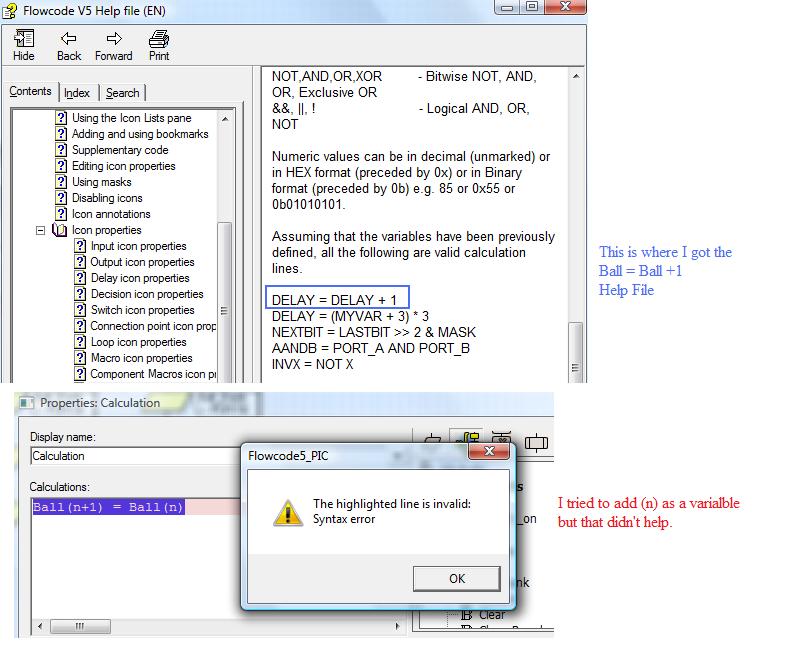
Ball(n+1) = Ball(n) - So in this formula would be placed in the Ball Macro ?
Would I then make a Variable setting for N = 0 ?
This error message is odd because the Value for Strike & Out don't appear to bother the program this is the odd thing I can't grasp.
Hope you can have a look at my project and see if I have anything more to fix. I would appreciate it.
John
Re: Activate PIC program
Posted: Wed Nov 28, 2012 1:31 am
by JLeith
Well I thought I would try the Ball = statement with your Ball(n+1) = Ball(n)
Now I added it to the Marco Ball and it does not like it.
Did I enter the info in the wrong place ?
John
- Ball+1.jpg (86.78 KiB) Viewed 7014 times
Re: Activate PIC program
Posted: Wed Nov 28, 2012 2:04 pm
by JonnyW
Hi. Apologies, I am not being clear. Your increment is fine - the 'Ball = Ball + 1' is valid code and increments Ball by 1. The 'Ball = Ball' does nothing - it increments Ball by zero.
I have modded your program to remove the redundant calculation icons. I'm afraid that things are too hectic here for me to go through your full program and amend anything else but your code looks pretty well organized and neat, which is a big plus when trying to find problems.
Good luck with your code.
Jonny
Re: Activate PIC program
Posted: Wed Nov 28, 2012 10:43 pm
by JLeith
Thank you Jonny for you time.
I now see the flow where when it starts off Ball = 0 and once it enters the Macro it is handle at that point.
With you help I can see it running cleaner. Thank you for the compliment on the neat code when I don't know the code and starting with nothing. I suspect others could do a vastly improved layout but I can follow my thoughts.
OK now I just have to do some clean up of display to lower my ROM size in the current state I can not make a HEX file. My program is to big for the 16F1826.
All the best,
John