Page 1 of 1
UART Issues
Posted: Tue Jan 23, 2018 9:58 am
by cubetronix
Hi,
Iam Using PIC18F67J11 Chip with external 20MHz Crystal between OSC1 & OSC2.
first step i checked a blink circuit it worked fine
second i added with UART-1 with Baud 9600 a simple string to Transmit while startup, but i cant receive a string and there are some JUNK in the RX window. I feel that Config Bits are not properly assigned. Kindly help with this
Thank You,
Re: UART Issues
Posted: Tue Jan 23, 2018 1:11 pm
by Benj
Hello,
Please can you attach your Flowcode project file so we can investigate for you.
Re: UART Issues
Posted: Wed Jan 24, 2018 8:09 am
by cubetronix
Benj wrote:Hello,
Please can you attach your Flowcode project file so we can investigate for you.
Re: UART Issues
Posted: Wed Jan 24, 2018 9:05 am
by QMESAR
cubetronix wrote: i added with UART-1 with Baud 9600 a simple string to Transmit while startup, but i cant receive a string and there are some JUNK in the RX window.
Looking at your Flowchart the baud is not set at 9600 it is set at 115200
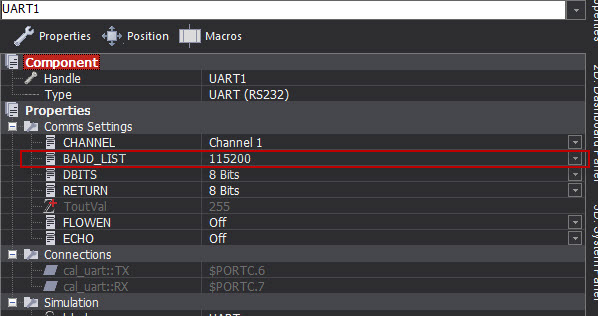
- Baud.jpg (56.28 KiB) Viewed 8642 times
In general if you are not clearing the Watchdog timer you should switch it off ,this can cause you some strange errors I do not see in your flowchart that you clear the Watchdog
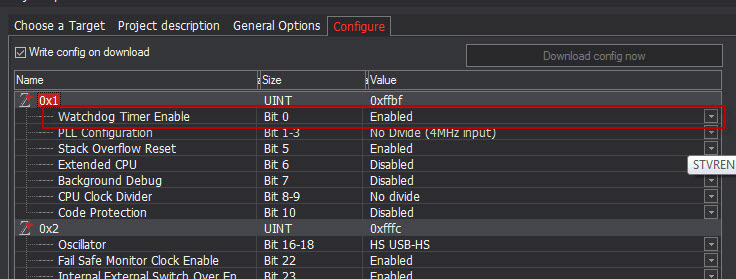
- WDT.jpg (76.2 KiB) Viewed 8642 times
you should also make sure your Oscillator settings are correct this device has a tricky setup for the Oscillator as general info to a UART that does not work
Re: UART Issues
Posted: Wed Jan 24, 2018 11:02 am
by cubetronix
QMESAR wrote:cubetronix wrote: i added with UART-1 with Baud 9600 a simple string to Transmit while startup, but i cant receive a string and there are some JUNK in the RX window.
Looking at your Flowchart the baud is not set at 9600 it is set at 115200
Baud.jpg
In general if you are not clearing the Watchdog timer you should switch it off ,this can cause you some strange errors I do not see in your flowchart that you clear the Watchdog
WDT.jpg
you should also make sure your Oscillator settings are correct this device has a tricky setup for the Oscillator as general info to a UART that does not work
Thanks for your prompt reply,
I know the baud rate is changed, yesterday i was trying with it and forget to change before sharing it,
the problem is same if i use any baud rate. and i want to know as per datasheet
Oscillator Types are
The PIC18F87J11 family of devices can be operated in
eight different oscillator modes:
1. HS High-Speed Crystal/Resonator
2. HSPLL High-Speed Crystal/Resonator
with Software PLL Control
3. EC External Clock with FOSC/4 Output
4. ECPLL External Clock with Software PLL
Control
5. INTIO1 Internal Oscillator Block with FOSC/4
Output on RA6 and I/O on RA7
6. INTIO2 Internal Oscillator Block with I/O on
RA6 and RA7
7. INTPLL1 Internal Oscillator Block with Software
PLL Control, FOSC/4 Output on RA6
and I/O on RA7
8. INTPLL2 Internal Oscillator Block with Software
PLL Control and I/O on RA6 and RA7
but in flow code7 Oscillator Types
HS USB-HS
HS + PLL HS-USB HS +PLL
i am using 20 MHz external crystal so in which mode i have to use
Thank You
Re: UART Issues
Posted: Sat Jan 27, 2018 8:54 am
by cubetronix
Hi, i still need help to resolve the issues, UART Prints Junk.
kindly help me
Re: UART Issues
Posted: Tue Jan 30, 2018 3:55 pm
by LeighM
I cannot yet see anything wrong.
HS USB-HS should be OK.
Could you explain more about your serial link hardware?
Re: UART Issues
Posted: Fri Feb 02, 2018 3:38 pm
by cubetronix
I found some compilation error before regarding XC8 and updated the XC8 from microchip now i found this warning, can some one help to resolve this. below is the compilation result for reference.
Target folder: G:\FLOW CODE\Projects\serial test
Source name: G:\FLOW CODE\Projects\serial test\serial test.fcfx
Title:
Description:
Device: PIC.18F.18F66J11
Generated by: Flowcode v7.2.1.4
Date: Friday, February 02, 2018 20:03:46
Users: 1
Registered to:
Licence key:
NOT FOR COMMERCIAL USE
http://www.flowcode.co.uk
Launching the compiler...
C:\Program Files (x86)\Flowcode 7\compilers\pic\bin\xc8.exe --chip=18F66J11 "serial test.c" --MSGDISABLE=359,1273,1388
Microchip MPLAB XC8 C Compiler (Free Mode) V1.41
Build date: Jan 24 2017
Part Support Version: 1.41
Copyright (C) 2017 Microchip Technology Inc.
License type: Node Configuration
. .
serial test.c:
34: __
config("__PROG_CONFIG", "pic18", 0x1, 0xFFFF);
^ (1504) the PIC18 extended instruction set was enabled but is not supported by this compiler
(908) exit status = 1
(908) exit status = 1
C:\Program Files (x86)\Flowcode 7\compilers\pic\bin\xc8.exe reported error code 1
FINISHED
Re: UART Issues
Posted: Fri Feb 02, 2018 3:44 pm
by QMESAR
Hi.
Try to Switch the Extended CPU instruction set off,
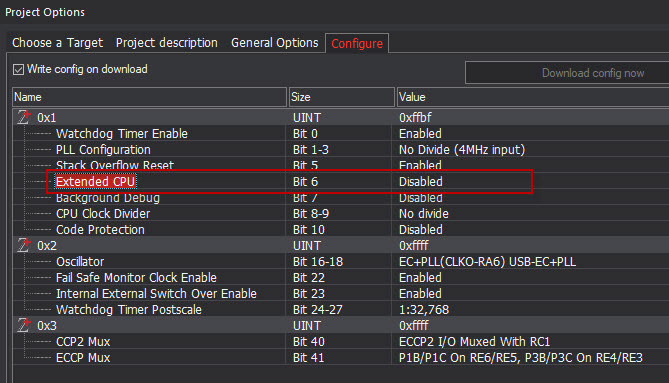
- 1.jpg (101.02 KiB) Viewed 8541 times
Re: UART Issues
Posted: Sat Feb 03, 2018 8:28 am
by cubetronix
QMESAR wrote:Hi.
Try to Switch the Extended CPU instruction set off,
Thanks for the reply, after disabling the extended CPU UART is working but only TX, i cant receive anything with or without interrupt. kindly check the flowcode.
Thank You
Re: UART Issues
Posted: Sat Feb 03, 2018 9:01 am
by QMESAR
Hi .
I see no problem with the Flowchart or the generated C code.
However not saying there is no error unfortunate I do not have such an device to test on HW
Are using real HW to test or Simulation in FC? (just a reminder FC does not simulate UART Interrupts)
Re: UART Issues
Posted: Sat Feb 03, 2018 11:39 am
by cubetronix
QMESAR wrote:Hi .
I see no problem with the Flowchart or the generated C code.
However not saying there is no error unfortunate I do not have such an device to test on HW
Are using real HW to test or Simulation in FC? (just a reminder FC does not simulate UART Interrupts)
i am using real HW.
Re: UART Issues
Posted: Mon Feb 05, 2018 11:39 am
by Benj
Hello,
In your UART_1 macro you need to call the ReceiveChar component macro to clear the UART RX buffer. Otherwise it may overflow and prevent more data coming in.