Page 1 of 1
RTC Clock
Posted: Fri Feb 08, 2019 1:34 pm
by Monie Jacobsen
Hi everybody
I will try to use Clock below:
viewtopic.php?f=28&t=20814
But how do I set the clock and date?
Would you like to illustrate where I am doing this?
How to set Date format as 08:02: 2019?
Any help would be greatly appreciated.
Have attached the code I want to use below
Re: RTC Clock
Posted: Fri Feb 08, 2019 2:26 pm
by LeighM
Hi Monie,
The RTC component (MCP7940N) returns or sets the Date with a 6 digit string in the format DDMMYY (e.g. the string of characters "080219")
Similarly the Time format is 6 digits HHMMSS (e.g. the string of characters "152701")
So to enable a MIAC user to set the time and date you will need have a menu option to do that.
Perhaps display the date and time on screen and use the left and right cursor to move between the digits,
and use up/down keys to increase or decrease a value. Then use SetDate() and SetTime() to write the new values to the RTC.
If you want a different format, not DDMMYY, on screen then you could copy the digits into a new string buffer,
similarly copy them back into a DDMMYY format before calling SetDate()
You will see examples of this in the linked posts.
Re: RTC Clock
Posted: Fri Feb 15, 2019 9:36 am
by Monie Jacobsen
Hi everybody
User: Flowcode v8 MIAC dsPIC RTC Clock
Have tried really many hours to enroll current Time and Date, but without success!
Can I get help on a description of how this should be done?
Have tried downhill with it does not succeed!
Example:
Date = 150219
1: Select (F1) for Date
2: 1
2: OK
Can't move on any more!
Would you like to help with an example of writing eg Date directly using the MIAC dsPIC KEY.
Have a lot for an example to be able to move on;-)
Re: RTC Clock
Posted: Fri Feb 15, 2019 12:32 pm
by LeighM
Try this ...
Re: RTC Clock
Posted: Fri Feb 15, 2019 12:39 pm
by LeighM
Re: RTC Clock
Posted: Fri Feb 15, 2019 12:48 pm
by Monie Jacobsen
Hi LeighM
Many thanks for the code example;
Everyday help

For information I use an old computer that's why I can still work with Flowcode v8,
Good weekend
Re: RTC Clock
Posted: Fri Feb 15, 2019 5:19 pm
by Monie Jacobsen
Hi everyone
Has the RTC Clock function "LeapYear = ! (Year MOD (Year / 4)) //1 = leap year"?
Re: RTC Clock
Posted: Fri Feb 15, 2019 6:09 pm
by LeighM
Yes, I believe that the RTC chip adjusts for leap years
Re: RTC Clock
Posted: Fri Feb 15, 2019 6:51 pm
by Monie Jacobsen
Hi LeighM
Thank you;-)
Good weekend
Re: RTC Clock
Posted: Sat Feb 16, 2019 6:49 pm
by Monie Jacobsen
Hi everyone
Want to convert from String to (Format Float) for the 3 variables below
and insert clock into the variable HOUR_FP etc.
1: HOUR_FP
2: MIN_FP
3: SEC_FP
Would you like to help with an example or description.
Please see here!
Attached coder:
Re: RTC Clock
Posted: Sun Feb 17, 2019 9:43 am
by Monie Jacobsen
Hi everyone
Want to upload the file below with failed.
Does anyone want to help upload files below and send it to my Private message here on Flowcode
Want to use the file in Flowcode v8

- UploafFile.JPG (12.76 KiB) Viewed 20333 times
Web Page:
viewtopic.php?f=28&t=12561&p=49998&hili ... oat#p49998
Re: RTC Clock
Posted: Sun Feb 17, 2019 10:18 am
by mnf
Hi Monie,
I've downloaded and posted to you - note that I'm not sure that I'd recommend you using it as a template - it was written way back and (for example) has a string called 'string' that Flowcode will choke on - I renamed it test to allow the flowchart to load - but you will need to change other occurrences! (An error box appeared behind the main FC window when I opened it)
The code uses a lot of Mid$ - and you would be better off using the index operator (a = s[0] for example)
Note also that the RTC doesn't accept floating point numbers - set / get time uses a string ('HHMMSS') - if you want to convert the parts of this from a string to a number you would use something like:
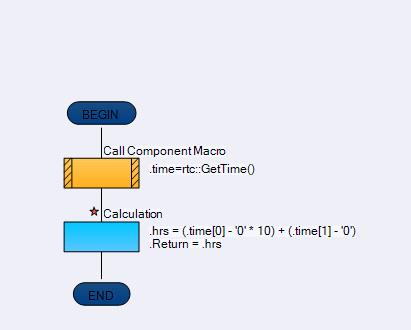
- time.JPG (10.22 KiB) Viewed 20331 times
- index 1 and 2 for minutes and 3, 4 for seconds.
If you need the values as a float then you can assign the value to a floating point variable (once converted to an int)
Conversion the other way
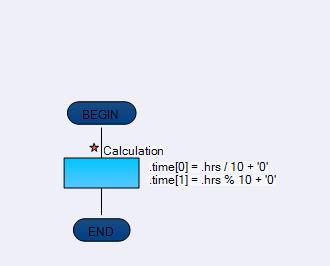
- time2.JPG (6.33 KiB) Viewed 20331 times
- why do you want to use a float - all the values are integer (0-23, 0-59) ?
Martin
Re: RTC Clock
Posted: Sun Feb 17, 2019 11:48 am
by Monie Jacobsen
Hi everyone
I want to implement "MIAC dsPICSetting Date Time-OK"
Attached file:
MIAC_dsPIC_Clock - Date and Time must be implanted in the file below...
Attached file:
There someone who will be helpful with the coder.