Page 1 of 1
RC5 component not working
Posted: Sat Jan 02, 2021 7:26 am
by kg300
I create Flowchart for rc5 that encode data from remote control and display on port-C to on off LEDs, but it not working. My remote and sensor is ok and work fine with Arduino IDE but not working with Flowchart and RC5.
Re: RC5 component not working
Posted: Sun Jan 03, 2021 3:16 am
by medelec35
Hi kg300,
As you have posted in the General Programming section we won't know what Flowcode version you are referring to?
I have just tested RC5 component.
Working correctly with Flowcode V7,8 & 9.
Have you tried the
1 Sec flash test?
Your circuit shows no crystal or resonator connected, your flowchart is configured as though there is!
Looking at your flowchart, you have the output of RC5 component connected to pin RA4.
However, on the circuit you posted, the output is connected to pin RB0.
You need bare in mind that the RC5 component goes from high to low when receiving a signal.
Therefore within RC5 properties the Invert Signal should be set for Yes.
You have it set to No.
Try the attached flowchart, which is configured as your circuit diagram.
Re: RC5 component not working
Posted: Mon Jan 04, 2021 12:06 pm
by Benj
Thanks Martin,
Appreciate you testing it for us

Re: RC5 component not working
Posted: Mon Jan 04, 2021 6:26 pm
by medelec35
You're welcome Ben.
Hopfully just the properties will sort it.
Re: RC5 component not working
Posted: Tue Jan 05, 2021 8:33 am
by kg300
medelec35 wrote: ↑Sun Jan 03, 2021 3:16 am
Hi kg300,
As you have posted in the General Programming section we won't know what Flowcode version you are referring to?
I have just tested RC5 component.
Working correctly with Flowcode V7,8 & 9.
Have you tried the
1 Sec flash test?
Your circuit shows no crystal or resonator connected, your flowchart is configured as though there is!
Looking at your flowchart, you have the output of RC5 component connected to pin RA4.
However, on the circuit you posted, the output is connected to pin RB0.
You need bare in mind that the RC5 component goes from high to low when receiving a signal.
Therefore within RC5 properties the Invert Signal should be set for Yes.
You have it set to No.
Try the attached flowchart, which is configured as your circuit diagram.
Flowcode version 8, attached a 20mHz crystal and connect output to RA4 but nothing will happen. Added an led point in flowchart to check where RC5 detect an IR signal but there is no response.
Re: RC5 component not working
Posted: Tue Jan 05, 2021 9:08 am
by kg300
when i attached the IR sensor and remote with Nano and IDE the result is here
Re: RC5 component not working
Posted: Tue Jan 05, 2021 1:31 pm
by medelec35
Did you try the 1 sec flash test first as it's important timing is correct?
Does the crystal you are using not require load capacitors to make sure frequency is correct?
Re: RC5 component not working
Posted: Tue Jan 05, 2021 1:50 pm
by kg300
medelec35 wrote: ↑Tue Jan 05, 2021 1:31 pm
Did you try the 1 sec flash test first as it's important timing is correct?
Does the crystal you are using not require load capacitors to make sure frequency is correct?
Can RC5 wil work with 4mhz internal clock. I try it but did not work.
Re: RC5 component not working
Posted: Tue Jan 05, 2021 5:35 pm
by medelec35
I have changed to the flowchart to run with 8MHz internal osc.
RC5 IR input has been changed to RA4.
if it does not work for you, I will try on hardware with internal osc.
Re: RC5 component not working
Posted: Wed Jan 06, 2021 8:36 am
by kg300
medelec35 wrote: ↑Tue Jan 05, 2021 5:35 pm
I have changed to the flowchart to run with 8MHz internal osc.
RC5 IR input has been changed to RA4.
if it does not work for you, I will try on hardware with internal osc.
thanks Martin for your responce. I checked your flowchart but it not working on hardware, even it not detect any IR signal from remote. I downloaded a flowchart from web created in V5 and tested it on hardware, it take some response to me. It detect IR signals and blink the LED but not decode the signals. Lcd always showing the same value
Re: RC5 component not working
Posted: Fri Feb 05, 2021 6:27 am
by jgu1
Hi kg300!
I follow this cause soon I want to play with this. Do you managed to get it work?
Jorgen
Re: RC5 component not working
Posted: Fri Feb 05, 2021 9:43 am
by medelec35
Don't forget to take in account, this is the RC5 type decoder.
Therefore it's not compatible with all remotes.
Could you be trying with a non c5 remote?
Re: RC5 component not working
Posted: Fri Feb 05, 2021 9:52 am
by Bachman
If you know how UART (RS232) is working, try IR remote decoder module. Works fine and it has UART input and output. I've tested all IR remotes at home, it's sees all one of them.
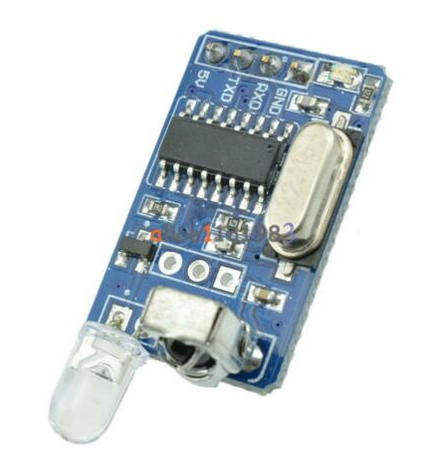
- IR decoder.png (259.64 KiB) Viewed 32842 times
Re: RC5 component not working
Posted: Fri Feb 05, 2021 11:42 am
by jgu1
Hi Backman!
Very interesting, do you have the name of it and where did you bougth this please.

Br Jorgen
Re: RC5 component not working
Posted: Fri Feb 05, 2021 2:30 pm
by Bachman
Hello!
Searc for: ir remote decoder module. eBay, Amazon, AliExpress etc.
Re: RC5 component not working
Posted: Fri Feb 05, 2021 3:12 pm
by jgu1
Thank you
Jorgen
Re: RC5 component not working
Posted: Sat Feb 06, 2021 11:44 am
by kg300
Bachman wrote: ↑Fri Feb 05, 2021 9:52 am
If you know how UART (RS232) is working, try IR remote decoder module. Works fine and it has UART input and output. I've tested all IR remotes at home, it's sees all one of them.
IR decoder.png
Thanks
Re: RC5 component not working
Posted: Sun Jun 20, 2021 4:45 pm
by patrick schoon
Hey Guys,
Let me hook up with this RC5 issue.
I'm also working on implementing the RC5 receiver in a project.
I started with the projects MCU (PIC24) on a high clock frequency. Got no results.
This was in FC9.
So I took out my e-Block kit with a simple MCU, PIC16F877A.
At first test (FC9) no results, switched over to FC8 and booked results.
The receiver is now working with a Xtal of 8mHz, option clock speed settings of 8mHz and in timer receive mode.
It's working flawless in this mode.
I prefer Interupt mode..
Can anyone tel me how this should work?
I also put in the 1second led flash for timing check.
With the right setting the timing is 2 second and not one as expected.
Something wrong here!!
I changed to 4MHz option clock speed and timing is 1sec. flash now.
With this setting i lose my display. Only strange characters. I expect the dispaly can't handle the higher bus rate.
The build in optical check is still working.
I also tested with a 16MHz xtal but this is not working.
So my conclusion is the timer is hooked on the xtal and this is only working at 8MHz, the devider settings do not work properly.
Changing the option clock does not influence the timers timing. It's still working. I tested this in FC8 and FC9.
Working RC5 receiver@8MHz:
There is still some homework for Matrix here.
I also like to use this RC5 macro but for now i can't.