Page 1 of 1
Graphical panel
Posted: Wed Jun 24, 2009 7:31 pm
by medelec35
How do I change the standard panel to look like this one please?
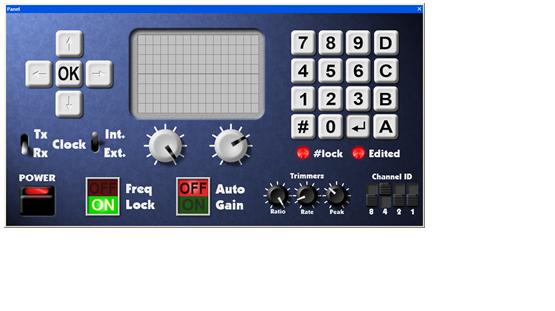
- Flowcode V4 panel.jpg (24.66 KiB) Viewed 3556 times
The Help file does not go in to any detail. If you are going to say use The image file in properties, what would be the image name a location pls?
Re: Graphical panel
Posted: Thu Jun 25, 2009 3:50 pm
by medelec35
The above picture is a screen shot from the help file, in the section 'Personalizing the simulation panel 'I would assume it is me not quiet understanding how to change form the standard panel, rather then this panel is not available since it is in the help file. If the picture file is not in the Flowcode directory, either can a link be posted, or the actual file please?
Re: Graphical panel
Posted: Fri Jun 26, 2009 8:06 am
by Steve
That picture is partly graphic and partly real Flowcode components. The image itself is not available.
Note that we have a number of custom images for components (leds, switches, etc), textures for panels and miscellaneous images (e.g. screw fittings). We forgot to make these available in the initial release of Flowcode, but they should be available fairly soon.