Page 1 of 1
Panel Change for V4.1
Posted: Mon Jul 27, 2009 8:03 am
by medelec35
Suggestion with panel.
I know some people did not like the way new panel has changed. I.e. you need to add text label. I personally think it’s a great idea.
I like this:
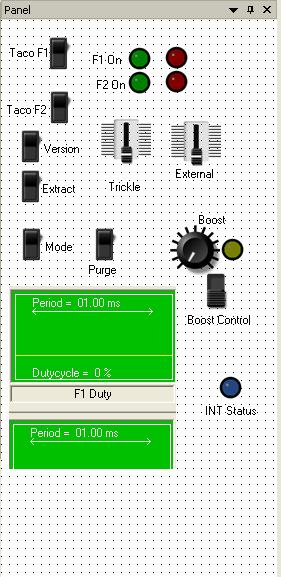
- V4 Panel.JPG (60.42 KiB) Viewed 6576 times
It would be a good idea to remove bug which displays only half of pwm channel 2

As a compromise: Instead of just add text then change caption option, how about as a default the component displays the channel, like it use to, but have a option to rename the channel. E.g. LED would display A1, You could either rename the A1, OR add a new text line anywhere like you can with V4
Re: Panel Change for V4.1
Posted: Mon Jul 27, 2009 10:26 am
by Benj
Hello
Thanks for your comments regarding labels.
We have not seen the PWM missing half a channel problem before. Are you able to replicate it?
Re: Panel Change for V4.1
Posted: Mon Jul 27, 2009 10:54 am
by Benj
Hello
We have now been able to recreate this PWM problem. Hopefully we can fix this in 4.1.
Re: Panel Change for V4.1
Posted: Mon Jul 27, 2009 12:04 pm
by medelec35
I have tried to replicate, since its not the first time lower PWM scope has been cut off,
However I have managed to loose both PWM scopes, and cannot see any menu to click on to show PWM. I have also increase panel area to size of a maximised dispaly, exit and re-opened flowchart and still not there.
Maybe I have to delete PWM icons and select them again?
Edit: I see you can replicate the problem.
How can I display my PWM scopes please?
Re: Panel Change for V4.1
Posted: Mon Jul 27, 2009 2:23 pm
by Sean
Hello,
I think we have been able to replicate the partially deleted PWM component problem: When a program is re-loaded with the lower part of the PWM component outside the panel boundary, the component is not redrawn properly if the panel is resized to make it visible. It is only redrawn if it is selected. This problem is now being corrected.
It is possible to move component icons out of the visible area of the panel. If the component is available, it should still be listed in the properties drop-down box for the panel.
Any active component can be selected from the drop-down box - even if it is not visible. If the component is not listed here then it has been deleted.
One of the properties listed for each component is Position - allowing the X and Y coordinates to be edited separately. If either of the coordinates is excessively large, or negative, the component will not be visible.
Setting both the X and Y coordinates to 0 should allow the component to appear at the top, left corner of the panel.
If the component is still not visible, and clicking near the top left corner of the panel of the panel only produces an empty set of selection bars, then please send us a copy of your program, as we are not able to replicate the problem.
Re: Panel Change for V4.1
Posted: Mon Jul 27, 2009 2:36 pm
by medelec35
sean wrote:One of the properties listed for each component is Position - allowing the X and Y coordinates to be edited separately. If either of the coordinates is excessively large, or negative, the component will not be visible.
Setting both the X and Y coordinates to 0 should allow the component to appear at the top, left corner of the panel.
Thank you Sean. That has brought PWM module back into panel.
The Y coordinates was over 1000, which I must of did, by trying to recreate problem.
Not played with properties of each component within panel before.
V4 panel is a big improvement on V3.
Re: Panel Change for V4.1
Posted: Mon Aug 03, 2009 1:32 pm
by mimiyum
Hello,
Just to add my comments on the panel. I also wish the components labels were back. They're very convenient and time saving. (Components could be moved around and the labels would just go with them wherever you put them)
I opened my V3 program on V4. Since it has a PWM component (which also appears as half only). When I add text, it takes some time to search for the text only to find out that it appears at the lower part of the panel which is not visible unless you drag the panel upward to reveal the hidden portion of the panel.
The text blocks are great but if possible, PLEASE return the component labels in v4.1
Thanks!
Mimiyum
Re: Panel Change for V4.1
Posted: Mon Aug 03, 2009 1:44 pm
by Sean
You will be pleased to know that, as a result of popular demand, labels have been re-introduced to the SWITCHbank, LEDarray, and ADC components.
These labels, and the PWM channel names, will be imported correctly from existing V3 programs. An update containing these changes will be available soon.
Re: Panel Change for V4.1
Posted: Mon Aug 03, 2009 2:05 pm
by mimiyum
Thank you! Hurray for Matrix Multimedia support! You're SUPER!