Page 1 of 1
Int to Float
Posted: Fri Sep 04, 2009 5:16 am
by Eric
Hello,
What is the correct way to convert an Int to Float in V4?
I tried a test with this program:
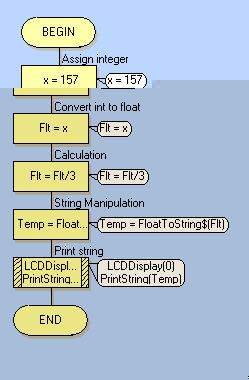
- snap0132.jpg (21.61 KiB) Viewed 6095 times
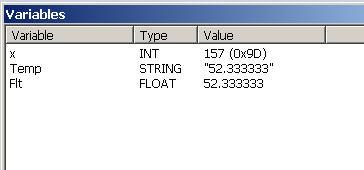
- snap0134.jpg (10.42 KiB) Viewed 6095 times
It simulates but it won't compile, giving this error:
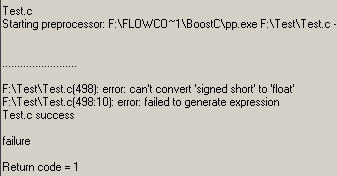
- snap0131.jpg (11.62 KiB) Viewed 6095 times
Searching the forum didn't clarified this. What went wrong?
Regards,
Eric
Re: Int to Float
Posted: Fri Sep 04, 2009 8:27 am
by Benj
Hello Eric
Using BoostC this is a little awkward.
You can do the following.
Using a C code icon and the flowcode variables fl_var and int_var.
FCV_FL_VAR = float32_to_int32(FCV_INT_VAR);
There are further functions available inside the calculation icon which can be used to do floating point calculations in BoostC. These functions will work inside the calculation icon.
Hope this helps.
Re: Int to Float
Posted: Fri Sep 04, 2009 8:58 am
by Eric
Not really, I still have errors.

- snap0135.jpg (23.39 KiB) Viewed 6058 times
Can you please verify or complete this test program so that this program works?
Thx,
Eric
Re: Int to Float
Posted: Fri Sep 04, 2009 3:28 pm
by Steve
Please try float32_from_int32 instead.
We will add these conversion routines into Flowcode itself so you do not need to resort to C code.
Re: Int to Float
Posted: Fri Sep 04, 2009 5:56 pm
by Eric
Good idea, because float32_from_int32 also gives similar errors.
Regards,
Eric
Re: Int to Float
Posted: Mon Sep 07, 2009 5:47 am
by Eric
And please don't wait until V5.
Send us an Flowcode 4.1 update

Rgds,
Eric
Re: Int to Float
Posted: Mon Sep 07, 2009 9:12 am
by Benj
Hello Eric
Here is a working version of your program.
Re: Int to Float
Posted: Mon Sep 07, 2009 10:33 am
by Eric
Thx Ben, now I see.
But the compiled program is hugh !
7.5K !
Floating point seems to consume a lot of resources.
Rgds,
Eric