Page 1 of 1
Delay using a variable
Posted: Wed Oct 21, 2009 12:27 pm
by Eric
Hello
Is it possible to create a delay in V4 using variables?
Consider this testprogram:
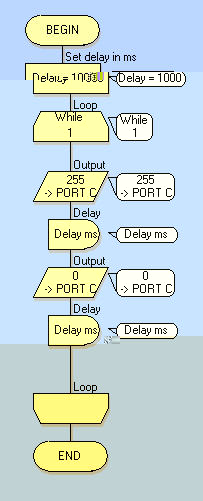
- snap0210.jpg (22.91 KiB) Viewed 9035 times
I need a delay with a value depending on certain conditions.
So I attributed the variable "delay" with the value 1000 ms.
In the delay icon I use this variable to generate my delay.
The problem I have is that if I want a delay of eg 1000 ms, the real delay on hardware seems always to be a delay of 250 ms.
Every value greater than 250 seems to generate the same delay of 250 ms.
If I don't use the variable " delay" but enter 1000 directly in the delay icon, the delay is ok.
Are there other ways to generate a delay using a variable?
Regards,
Eric
Re: Delay using a variable
Posted: Wed Oct 21, 2009 1:33 pm
by fresh
Is your variable = BYTE or INT ?
Re: Delay using a variable
Posted: Wed Oct 21, 2009 2:31 pm
by Benj
If your variable is a byte then you are assigning the following
byte = 1000 which actually equals 1000 MOD 255 which is 235.
You can go into the variable manager by clicking Edit -> Variables and then use the rename vairable button to convert the variable from a byte to an int. Your calculation will then correctly assign the value 1000 to the variable.
Re: Delay using a variable
Posted: Thu Oct 22, 2009 5:35 am
by Eric
That was my first idea too, but the variable is effectively type INT.
I also need to say that it simulates well in Flowcode ( it simulates 1 sec ), but in real hardware it doesn't work correct.
Maybe somebody can try it on his hardware to verify this.
Rgds,
Eric
Re: Delay using a variable
Posted: Thu Oct 22, 2009 6:13 am
by medelec35
Benj wrote:You can go into the variable manager by clicking Edit -> Variables and then use the rename vairable button to convert the variable from a byte to an int. Your calculation will then correctly assign the value 1000 to the variable.
Sorry Ben I don't agree.
if you assigned Variable to int, the delay will still only last for 220ms and not 1000ms (unless I am missing something?)
Has to be 10 loops of 100ms.
If I am wrong, will say sorry later

Re: Delay using a variable
Posted: Thu Oct 22, 2009 8:45 am
by Benj
Hello
Yes it looks like Medelec is right here

The problem is that the boostC delay function only allows a byte parameter. When you give flowcode a fixed delay eg 1000 ms then it breaks this down into a series of calls that all use bytes. If you are using a variable value then Flowcode cannot do this correctly.
My suggestion would be to divide your delay value by 10 and then create a loop that runs 10 times. Inside the loop add your delay icon and your program should then run correctly on the hardware and the simulation. Alternativley replace the 10 with a number that yields delays no larger then 255ms.
Re: Delay using a variable
Posted: Thu Oct 22, 2009 2:56 pm
by medelec35
Eric. Your best way to achieve high number delay is the way Ben suggested in a different post:
Benj wrote:When using a variable delay you can do something similar to the following where delayval is your INT delay variable.
calc: delayval = 800
loop: delayval > 255
{
delayms: 255
calc: delayval = delayval - 255
}
delayms: delayval
I know it works because I have use a variable=1520. then created a simple flowchart to give 1520ms delay.
Re: Delay using a variable
Posted: Thu Oct 22, 2009 3:26 pm
by medelec35
Here you are. based on Bens idea. You can enter a larger value variable for a delay. In the example I have set delay variable for 1000, giving a delay of 1000ms.
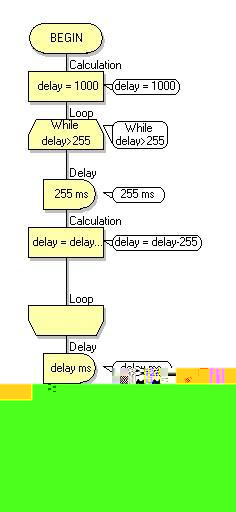
- large Var Delay.JPG (17.08 KiB) Viewed 8956 times
Re: Delay using a variable
Posted: Thu Oct 22, 2009 4:11 pm
by Benj
Thanks Medelec
I knew I had come up with a better way of doing this before. Must be having a bad day today

Re: Delay using a variable
Posted: Thu Oct 22, 2009 6:00 pm
by Eric
Thanks guys, this helps a lot.
Regards,
Eric