Page 1 of 2
Re: Want to use different programmer
Posted: Mon Mar 08, 2010 7:58 am
by Steve
Sorry - I don't have any experience with this programmer. If there is a command-line interface for it, then you should be able to use it. Presumably the information you require is in the manual for this programmer.
Re: Want to use different programmer
Posted: Wed Mar 10, 2010 2:44 pm
by Steve
You need to make sure your config word is appropriate for the chip and hardware you are using - especially the oscillator settings. There are plenty of posts on this forum that should help you with this.
Re: Want to use different programmer
Posted: Thu Mar 11, 2010 11:50 am
by Benj
Hello,
You need to click on Chip -> Configure. This allows you to see the configuration. Switch the setting to XTAL and Watchdog to off and click ok and this should allow your chip to run using an external crystal. If you want to see the entire configuration options then click on the expert settings. Each of the settings is described in the configuration section of the device datasheet.
The OSCCON register is only used when you want to use an internal oscillator and the 16F877A does not have this functionality.
Re: Want to use different programmer
Posted: Thu Mar 11, 2010 8:04 pm
by medelec35
quote="scorpy77"]When i load the file into the programmer it gives me a message no configuration word in hex file.
best regards.[/quote]
If using flowcode V3 then install ppp
1st go to chip menu then select compiler options.
(just as a once off, click on ''Restore Defaults')
Then make sure 'Use external program to set configuration options' is ticked.
Click OK.
Now select 'Chip' and 'Configure...'
Click 'Switch To Expert screen' (don't let the word 'Expert' put you off!)
Now set to following settings:
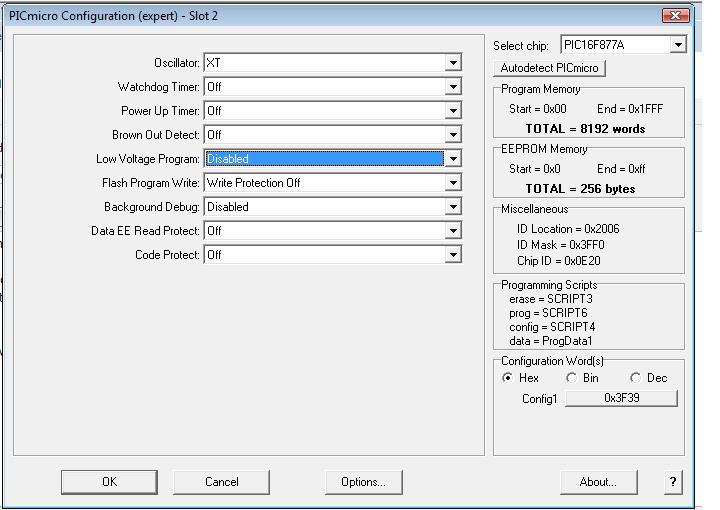
- Config settings.jpg (59.59 KiB) Viewed 11785 times
Click 'OK'
Now when you select 'Compile to Hex' The Configuration words should be saved.
If you have any problems and you don't mind posting your flowcode, I can change it for you and re-post it.
You should also make sure your clock speed is set to the exact frequency of your crystal e.g 4000000 if using a 4MHz crystal. Set in 'Chip' & 'Clock speed' (in flowcode V3 only)
Re: Want to use different programmer
Posted: Fri Mar 12, 2010 3:09 pm
by Benj
Hello Scorpy
Your configuration looks ok. You could try the HS oscillator mode instead of the XT mode as 4MHz is the cut off between the modes.
Do you have to do anything on your programming hardware to connect the crystal to the device?
Re: Want to use different programmer
Posted: Fri Mar 12, 2010 4:42 pm
by medelec35
scorpy77 wrote: When i load the file into the programmer it gives me a message no configuration word in hex file. do i have to manually enter the code for clock etc? .
This is the bit that appears to be the issue. The config settings are not being transferred to the programmer.
You can always try the following:
Go back to 'chip' 'compiler options'
un-tick 'Use external program to set configuration options', then OK.
Select 'Chip' 'Configure'. Can you see 0x2007,0x3f39 in the configuration box?
If not, then try entering it.
After selecting OK then 'compile to hex'
See if you still get a 'no configuration word in hex' message.
If still having problems, can you post the compiled hex file please.
If you have MPLAB installed, you can import hex file , and set configuration settings. Save hex. That's just a temporary get around fix until issue is sorted.
Reason I have asked for your hex file is I want to see if configuration word is present, then it is possibly down to your programmer?
Re: Want to use different programmer
Posted: Fri Mar 12, 2010 7:39 pm
by medelec35
Loaded your hex in mplab, and config data is definitely being saved, and is correct.
So either is down to your programmer, or go with what Ben suggested and change oscillator setting. But that would not account for the config warning message. Can you borrow a different programmer to try? Also is your hardware connected ok?
Re: Want to use different programmer
Posted: Fri Mar 12, 2010 9:00 pm
by medelec35
scorpy77 wrote: did u have a look at screen shots of programmer configuration window? i also sent u the config details for the programmer.
Best Regards.
Can't see any screen shots or attachments.
Nothing in my inbox either.
Can you also upload the the circuit + component values you are using please.
Re: Want to use different programmer
Posted: Fri Mar 12, 2010 10:51 pm
by medelec35
I'm no expert, but it looks to me like your programmer config is overwriting the config within the hex file. E.g LVP and Debug should be off. It also looks like your watchdog timer is enabled so that should be unselected as well, otherwise If you not got a several c code icons with with clear_wdt(); then your program will never run due to continuous watchdog time outs. This is what could be happening? Is there an option to load config from hex file and unselected manual settings?
Re: Want to use different programmer
Posted: Sat Mar 13, 2010 8:28 pm
by medelec35
The last two don't really matter. The LVP uses RB3 to program chip. So you are tying up a pin since if use for LVP, can't be used for general use. this makes programs more difficult to develop. Best to use HVP. There are plenty of references around about LVP and brown out etc.
Glad your up and running mate! (well hope you are, since you only said should

)