Page 1 of 1
18F4550 and flowcode 4.3
Posted: Mon May 17, 2010 6:28 am
by Roy Johnston
I initial bought flowcode pro ver 4.0. Originally we had a problem with compiling to hex. You were so kind as to send me updated set of USB files. Which worked. However I have since upgraded to ver. 4.3. The same flow code files appear to compile correctly. But when running the chip all outputs are set to high. If I downgrade to ver. 4.0 it compiles and works correctly. I have even tried to install 4.3 and then update the usb files you gave me but the same result is achieved. Is there something I am doing wrong?
Re: 18F4550 and flowcode 4.3
Posted: Mon May 17, 2010 7:35 am
by Steve
It would help us greatly if you can provide compiled C code files for a v4.0 program that works and a v4.3 program that doesn't.
Re: 18F4550 and flowcode 4.3
Posted: Mon May 17, 2010 9:24 am
by Roy Johnston
it is exactly the same flowcode files here they are. the same file compiled in ver 4 works but does not in ver 4.3.
i suspect that i may have to start the project from scratch in ver 4.3
Re: 18F4550 and flowcode 4.3
Posted: Mon May 17, 2010 9:45 am
by Benj
Hello Roy,
Please can you compile the code to C in both v4.3 and v4.0 and upload the C files to the forum, I will see if I can find the difference that is causing your problems.
As far as I am aware the USB components are 100% functional in v4.3 so this is news to me if your device is not working correctly.
Are you still using the default BoostC compiler?
Re: 18F4550 and flowcode 4.3
Posted: Mon May 17, 2010 9:56 am
by Roy Johnston
Herewith 3 files
1) the original flowcode file
2) this file compiled in ver 4.0
3) this file compiled in ver 4.3
Re: 18F4550 and flowcode 4.3
Posted: Mon May 17, 2010 11:56 am
by Benj
Hello Roy,
Thanks for sending over the files. There is one small problem with your program that may be causing the problems. At the start of your service macro you have a USB Get String function. This is not required and may be causing the problems you are experiencing. The string is automatically renewed when the service macro is called.
The way strings has been handled in Flowcode has been upgraded since v4.0 so this unnessisary macro call may not have originally caused a problem in v4.0 but cound be now cauing problems in v4.3.
Other then this the device seems to be installing itself correctly into the system so the USB architecture is performing correctly.
Let me know if this fixes your problem.
Re: 18F4550 and flowcode 4.3
Posted: Mon May 17, 2010 1:53 pm
by Roy Johnston
No it did not help
all outputs are going into a high as soon as the service makro starts, and they remain highy all input no problem
Re: 18F4550 and flowcode 4.3
Posted: Mon May 17, 2010 3:03 pm
by Roy Johnston
what i did was i deleted all outputs and only put in 1 output , the contents of a variable to a port D0, i can control it no problem. i then put in a second output D1, i can only control this one if D0 is high, if D0 is low , i cannot switch d1 on an off. I use 0 for a low an a 1 for a high.
Re: 18F4550 and flowcode 4.3
Posted: Mon May 17, 2010 4:13 pm
by Benj
Hi Roy,
Please can you send me the new program and I will look into this problem for you. Also if you have VB or other PC end code that goes w3ith then that would also be handy for testing. If you don't want to release publically then you can PM me with the files and I will ensure they are destroyed on completion.
Re: 18F4550 and flowcode 4.3
Posted: Mon May 17, 2010 4:24 pm
by Roy Johnston
The problem is i cannot control each output individually- am i correct in saying a 1 will port the port high and a 0 will put the port low.
my main prograhmn is written in msaccess 2007 VB.
Re: 18F4550 and flowcode 4.3
Posted: Mon May 17, 2010 5:27 pm
by Roy Johnston
Right i have mange to determine that i can control the outputs on d0 and d1 correctly provided the bit is stipulated as a 1 or 0 in the output, if i take the data from the service marcro it does not work, i suspect it is not reading in the correct data, however on ver 4.0 it works perfectly.
service_macro.a[0]- works perfectly
service_macro.a[1]-does not work unless service_macro.a[0]= 1
service_macro.a[2]-does not work unless service_macro.a[0]= 1 and service_macro.a[1]= 1.
Re: 18F4550 and flowcode 4.3
Posted: Mon May 17, 2010 5:54 pm
by Roy Johnston
herewith code as requested
1) reading data from the chip into VB is no problem.
2) writing data i have to change [0] to a 1 and then [1] to a 1 and so on, if i do it in that order then i can switch all of them on and if i reverse it i sussessfully switch off the outputs. but this means position 1 has to be high for me to switch on position 2 and so on.
Private Sub Form_timer()
Dim tempx2 As Byte
Dim tempx3 As Byte
Dim tempx6 As Byte
Dim tempx7 As Byte
Dim tempx12 As Byte
Dim tempx13 As Byte
Dim tempx16 As Byte
Dim tempx17 As Byte
Dim lRetVal As Long
Dim bDataOut(0 To 24) As Byte
Dim bDataIn(0 To 24) As Byte
Dim nTxDataCnt As Long
Dim nRxDataCnt As Long
If Me.y0 = -1 Then
bDataOut(0) = 1
Else
bDataOut(0) = 0
End If
If Me.y1 = -1 Then
bDataOut(1) = 1
Else
bDataOut(1) = 0
End If
If Me.y2 = -1 Then
bDataOut(2) = 1
Else
bDataOut(2) = 0
End If
If Me.y3 = -1 Then
bDataOut(3) = 1
Else
bDataOut(3) = 0
End If
If Me.y4 = -1 Then
bDataOut(4) = 1
Else
bDataOut(4) = 0
End If
If Me.y5 = -1 Then
bDataOut(5) = 1
Else
bDataOut(5) = 0
End If
If Me.y6 = -1 Then
bDataOut(6) = 1
Else
bDataOut(6) = 0
End If
If Me.y7 = -1 Then
bDataOut(7) = 1
Else
bDataOut(7) = 0
End If
If Me.y10 = -1 Then
bDataOut(8) = 1
Else
bDataOut(8) = 0
End If
If Me.y11 = -1 Then
bDataOut(9) = 1
Else
bDataOut(9) = 0
End If
If Me.y12 = -1 Then
bDataOut(10) = 1
Else
bDataOut(10) = 0
End If
If Me.y13 = -1 Then
bDataOut(11) = 1
Else
bDataOut(11) = 0
End If
If Me.y14 = -1 Then
bDataOut(12) = 1
Else
bDataOut(12) = 0
End If
If Me.y15 = -1 Then
bDataOut(13) = 1
Else
bDataOut(13) = 0
End If
If Me.y16 = -1 Then
bDataOut(14) = 1
Else
bDataOut(14) = 0
End If
If Me.y17 = -1 Then
bDataOut(15) = 1
Else
bDataOut(15) = 0
End If
If Me.y20 = -1 Then
bDataOut(16) = 1
Else
bDataOut(16) = 0
End If
If Me.y21 = -1 Then
bDataOut(17) = 1
Else
bDataOut(17) = 0
End If
If Me.pwm < 0 Then Me.pwm = 0
If Me.pwm > 100 Then Me.pwm = 100
bDataOut(18) = Nz(Me.pwm)
bDataOut(19) = 0
bDataOut(20) = 0
bDataOut(21) = 0
bDataOut(22) = 0
bDataOut(23) = 0
bDataOut(24) = 0
Dim sID(0 To 20) As Byte
sID(0) = Asc("v")
sID(1) = Asc("i")
sID(2) = Asc("d")
sID(3) = Asc("_")
sID(4) = Asc("1")
sID(5) = Asc("2")
sID(6) = Asc("b")
sID(7) = Asc("f")
sID(8) = Asc("&")
sID(9) = Asc("p")
sID(10) = Asc("i")
sID(11) = Asc("d")
sID(12) = Asc("_")
sID(13) = Asc("f")
sID(14) = Asc("f")
sID(15) = Asc("0")
sID(16) = Asc("5")
sID(17) = 0
lRetVal = ECIO_Open(0, sID(0))
lRetVal = ECIO_Transmit(bDataOut(0), 24, nTxDataCnt, bDataIn(0), 24, nRxDataCnt, 500)
ECIO_Close
If bDataIn(0) = 0 Then
Me.Connected = "USB Not Connected"
Me.Connected.BackColor = (vbRed)
Else
Me.Connected = "USB Connected - Ver" & " " & bDataIn(0)
Me.Connected.BackColor = (vbGreen)
End If
Me.ad1 = bDataIn(1)
Me.ad2 = bDataIn(2)
Me.ad3 = bDataIn(3)
Me.ad4 = bDataIn(4)
Me.x0 = bDataIn(5) * -1
Me.x1 = bDataIn(6) * -1
tempx2 = bDataIn(7)
tempx3 = bDataIn(8)
Me.x4 = bDataIn(9) * -1
Me.x5 = bDataIn(10) * -1
tempx6 = bDataIn(11)
tempx7 = bDataIn(12)
Me.x10 = bDataIn(13) * -1
Me.x11 = bDataIn(14) * -1
tempx12 = bDataIn(15)
tempx13 = bDataIn(16)
Me.x14 = bDataIn(17) * -1
Me.x15 = bDataIn(18) * -1
tempx16 = bDataIn(19)
tempx17 = bDataIn(20)
If tempx2 > 100 Then
x2 = 0
Else
x2 = -1
End If
If tempx3 > 100 Then
x3 = 0
Else
x3 = -1
End If
If tempx6 > 100 Then
x6 = 0
Else
x6 = -1
End If
If tempx7 > 100 Then
x7 = 0
Else
x7 = -1
End If
If tempx12 > 100 Then
x12 = 0
Else
x12 = -1
End If
If tempx13 > 100 Then
x13 = 0
Else
x13 = -1
End If
If tempx16 > 100 Then
x16 = 0
Else
x16 = -1
End If
If tempx17 > 100 Then
x17 = 0
Else
x17 = -1
End If
End Sub
Re: 18F4550 and flowcode 4.3
Posted: Mon May 17, 2010 6:39 pm
by Roy Johnston
I sorted out the problem, if you send down a value of 0 then it confuses the data being read into the service macro. by sending either a 1 or 2 and then using if statments to decode a 2 as a 1 and a 1 as a 0 then it works perfectly.
it seems to me in ver 4.3 using a usb slave and a string you cannot send a Zero '"0".
Re: 18F4550 and flowcode 4.3
Posted: Mon May 17, 2010 7:06 pm
by Roy Johnston
herewith VBcode for workaround as well as flowcode file
Private Sub Form_timer()
Dim tempx2 As Byte
Dim tempx3 As Byte
Dim tempx6 As Byte
Dim tempx7 As Byte
Dim tempx12 As Byte
Dim tempx13 As Byte
Dim tempx16 As Byte
Dim tempx17 As Byte
Dim lRetVal As Long
Dim bDataOut(0 To 25) As Byte
Dim bDataIn(0 To 25) As Byte
Dim nTxDataCnt As Long
Dim nRxDataCnt As Long
If Me.y0 = -1 Then
bDataOut(0) = 2
Else
bDataOut(0) = 1
End If
If Me.y1 = -1 Then
bDataOut(1) = 2
Else
bDataOut(1) = 1
End If
If Me.y2 = -1 Then
bDataOut(2) = 2
Else
bDataOut(2) = 1
End If
If Me.y3 = -1 Then
bDataOut(3) = 2
Else
bDataOut(3) = 1
End If
If Me.y4 = -1 Then
bDataOut(4) = 2
Else
bDataOut(4) = 1
End If
If Me.y5 = -1 Then
bDataOut(5) = 2
Else
bDataOut(5) = 1
End If
If Me.y6 = -1 Then
bDataOut(6) = 2
Else
bDataOut(6) = 1
End If
If Me.y7 = -1 Then
bDataOut(7) = 2
Else
bDataOut(7) = 1
End If
If Me.y10 = -1 Then
bDataOut(8) = 2
Else
bDataOut(8) = 1
End If
If Me.y11 = -1 Then
bDataOut(9) = 2
Else
bDataOut(9) = 1
End If
If Me.y12 = -1 Then
bDataOut(10) = 2
Else
bDataOut(10) = 1
End If
If Me.y13 = -1 Then
bDataOut(11) = 2
Else
bDataOut(11) = 1
End If
If Me.y14 = -1 Then
bDataOut(12) = 2
Else
bDataOut(12) = 1
End If
If Me.y15 = -1 Then
bDataOut(13) = 2
Else
bDataOut(13) = 1
End If
If Me.y16 = -1 Then
bDataOut(14) = 2
Else
bDataOut(14) = 1
End If
If Me.y17 = -1 Then
bDataOut(15) = 2
Else
bDataOut(15) = 1
End If
If Me.y20 = -1 Then
bDataOut(16) = 2
Else
bDataOut(16) = 1
End If
If Me.y21 = -1 Then
bDataOut(17) = 2
Else
bDataOut(17) = 1
End If
If Me.pwm < 0 Then Me.pwm = 0
If Me.pwm > 100 Then Me.pwm = 100
bDataOut(18) = Nz(Me.pwm)
bDataOut(19) = 1
bDataOut(20) = 1
bDataOut(21) = 1
bDataOut(22) = 1
bDataOut(23) = 1
bDataOut(24) = 1
bDataOut(25) = 1
Dim sID(0 To 20) As Byte
sID(0) = Asc("v")
sID(1) = Asc("i")
sID(2) = Asc("d")
sID(3) = Asc("_")
sID(4) = Asc("1")
sID(5) = Asc("2")
sID(6) = Asc("b")
sID(7) = Asc("f")
sID(8) = Asc("&")
sID(9) = Asc("p")
sID(10) = Asc("i")
sID(11) = Asc("d")
sID(12) = Asc("_")
sID(13) = Asc("f")
sID(14) = Asc("f")
sID(15) = Asc("0")
sID(16) = Asc("5")
sID(17) = 0
lRetVal = ECIO_Open(0, sID(0))
lRetVal = ECIO_Transmit(bDataOut(0), 25, nTxDataCnt, bDataIn(0), 25, nRxDataCnt, 500)
ECIO_Close
If bDataIn(0) = 0 Then
Me.Connected = "USB Not Connected"
Me.Connected.BackColor = (vbRed)
Else
Me.Connected = "USB Connected - Ver" & " " & bDataIn(0)
Me.Connected.BackColor = (vbGreen)
End If
Me.ad1 = bDataIn(1)
Me.ad2 = bDataIn(2)
Me.ad3 = bDataIn(3)
Me.ad4 = bDataIn(4)
Me.x0 = bDataIn(5) * -1
Me.x1 = bDataIn(6) * -1
tempx2 = bDataIn(7)
tempx3 = bDataIn(8)
Me.x4 = bDataIn(9) * -1
Me.x5 = bDataIn(10) * -1
tempx6 = bDataIn(11)
tempx7 = bDataIn(12)
Me.x10 = bDataIn(13) * -1
Me.x11 = bDataIn(14) * -1
tempx12 = bDataIn(15)
tempx13 = bDataIn(16)
Me.x14 = bDataIn(17) * -1
Me.x15 = bDataIn(18) * -1
tempx16 = bDataIn(19)
tempx17 = bDataIn(20)
If tempx2 > 100 Then
x2 = 0
Else
x2 = -1
End If
If tempx3 > 100 Then
x3 = 0
Else
x3 = -1
End If
If tempx6 > 100 Then
x6 = 0
Else
x6 = -1
End If
If tempx7 > 100 Then
x7 = 0
Else
x7 = -1
End If
If tempx12 > 100 Then
x12 = 0
Else
x12 = -1
End If
If tempx13 > 100 Then
x13 = 0
Else
x13 = -1
End If
If tempx16 > 100 Then
x16 = 0
Else
x16 = -1
End If
If tempx17 > 100 Then
x17 = 0
Else
x17 = -1
End If
End Sub
Re: 18F4550 and flowcode 4.3
Posted: Tue May 18, 2010 4:39 am
by Roy Johnston
After sleeping on it i come to the following conclusion. that the string reads in until it comes accross a zero and it does not read the rest of the string
Re: 18F4550 and flowcode 4.3
Posted: Tue May 18, 2010 9:07 am
by Benj
Hello Roy,
Your quite right the 0 terminates the string and the component does not read past it when copying it from the incoming buffer to the access buffer.
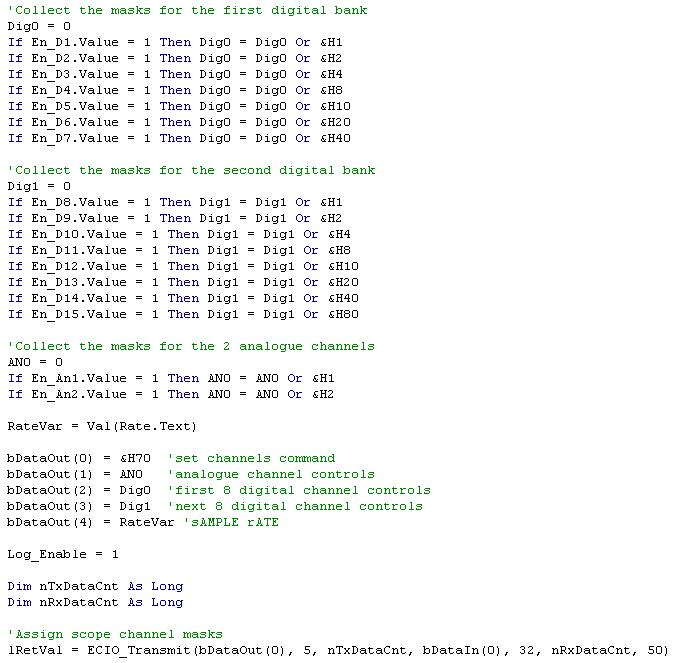
Could you not simply use the byte method and send the bytes directly out to each port. Eg have 3 or 4 byte parameters in the service routine and use these to control entire ports. This would iliminate the 0 problem as this only effects string variables.
The VB would become a little bit more tricky as you would have to work out what each switches value would be within the byte.
eg 1, 2, 4, 8, 16, 32, 64, 128
Here is a VB program I wrote that does a similar thing.
- ss1.JPG (70.65 KiB) Viewed 9651 times
Re: 18F4550 and flowcode 4.3
Posted: Tue May 18, 2010 9:11 am
by Roy Johnston
Thanks
i already worked it out and have sussessfully run the card.