Page 1 of 1
RC5 E Block
Posted: Thu Aug 26, 2010 11:16 am
by JohnCrow
Hi
Ive just ordered the RC5 Infared E block. The website indicates a flowcode macro is available for it, but I cannot see it in my flowcode installation (latest version)
Is it a seperate download or will it be included in the next update.
Thanks
Re: RC5 E Block
Posted: Thu Aug 26, 2010 11:19 am
by Benj
Hello John,
Yes this should be available in the next release of Flowcode.
In the mean time you can use the code shown here as a basis for the RC5 receive function.
http://www.matrixmultimedia.com/mmforum ... =26&t=7246
Re: RC5 E Block
Posted: Thu Aug 26, 2010 11:28 am
by JohnCrow
Thanks
Re: RC5 E Block
Posted: Fri Aug 27, 2010 9:44 am
by Stanga
Is the RC5 compatible version of the next Flowcode going to be out this side of Christmas? I too rushed to ordered the new RC5 E Block after receiving an email notification of its arrival and the availability of the macro. But it now appears that I should have not been so hasty to try out the latest E Block.
Re: RC5 E Block
Posted: Fri Aug 27, 2010 12:48 pm
by Benj
Hello,
We have example code that will work so its not the end of the world and you will be able to use the E-block.
Basically for the receive functionality to work you will need a free interrupt pin and also a unused timer on your device. We can then show you how to rig this up.
For the transmit functionality to work you will need a free PWM pin operating at 36KHz or your IR carrier frequency and then a further I/O pin to control the output data.
Cant say for sure when the RC5 component will be added but hopefully this will not be too far down the line.
Re: RC5 E Block
Posted: Thu Sep 02, 2010 5:31 pm
by JohnCrow
Hi Ben
Just received my IR board today
Is it possible to post a copy of the hex test file EB060_test.hex refered to in the data sheet please, then I know all is working both board and that my IR remote control is compatible before I try and do something with the flowcode examples refered to in the earlier posts.
Thanks
Re: RC5 E Block
Posted: Fri Sep 03, 2010 2:31 pm
by Sean
The user test/demonstration program described in the data sheet has not been completed yet. I have attached a version of the factory test program that should confirm correct operation of the board, and indicate how programs can be developed.
The program is for a PIC16F877A running at 19.6608MHz.
It required the EB060 connected to be connected to Port C, with the connection configuration jumper set to option B, J2 set to 5V, and J8 set to the OFF location.
A 5V supply should be connected to the +V terminal.
A wire link needs to be connected between socket 6 of the J9 patch terminal on the EB060 and the RB0/INT pin of the F877A.
A display is produced on an EB005 LCD E-block connected to Port D.
The program sends incrementing count values to the transmitter. Anything valid signal detected by the receiver is displayed on the LCD.
The receiver can usually detect the transmitted signal direcly, or from any reflecting surface.
A compatible handset can be used to transmit additional signals, which will be displayed on the LCD and can be seen to affect the normal count sequence.
Re: RC5 E Block
Posted: Fri Sep 03, 2010 5:30 pm
by JohnCrow
Thanks
Initial tests not showing anything. Have to try again over the weekend when i have more time.
This gives me a start anyway.
Re: RC5 E Block
Posted: Wed Sep 08, 2010 7:36 am
by Stanga
Anybody managed to get it to work? I haven't had any luck either. I's a pity that the routine has not been written for the HP488 as well.
Re: RC5 E Block
Posted: Wed Sep 08, 2010 8:45 am
by JohnCrow
We will just have to wait for the guys at Matrix to to get the Flowcode macros working.
Im sure they will be released as soon as possible

Re: RC5 E Block
Posted: Wed Sep 08, 2010 9:11 am
by Steve
Just to let you know, we have prioritised this and will have something for you as soon as we can.
Re: RC5 E Block
Posted: Wed Sep 08, 2010 11:26 am
by Stanga
In case it is of any help: I have observed the waveform at RB0/INT with a 150MHz scope. The waveform is clean and noise free with a 5V amplitude. So the EB060 is working fine.
Re: RC5 E Block
Posted: Wed Sep 08, 2010 12:03 pm
by Benj
Hello,
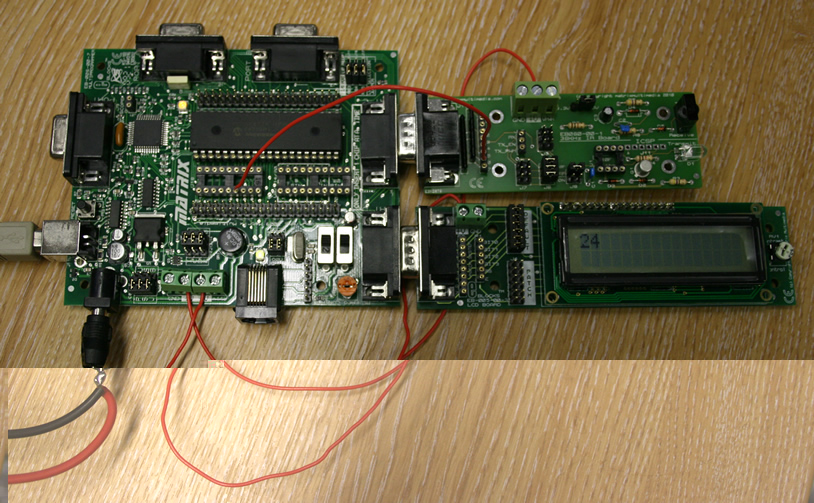
I have just tried Sean's program and it is working fine for me. Please can you compare your setup with the attached picture and see if anything is out of place.
- IMG_1801.jpg (246.61 KiB) Viewed 11637 times
Key areas to check.
Oscillator Switch Setting - XTAL.
Crystal - 19.6608MHz.
Wire from pin 6 to RB0 - Pin 6 of the 18way socket is an easy option.
EB006's +V connected to EB060's +V.
Re: RC5 E Block
Posted: Wed Sep 08, 2010 1:04 pm
by Benj
The E-Blocks datasheets page now contains relevant sample information for all of the new E-Blocks.
http://www.matrixmultimedia.com/eblock_datasheets.php
Re: RC5 E Block
Posted: Wed Sep 08, 2010 6:34 pm
by JohnCrow
Finally managed to get it working. Not sure what the problem was, but tried re-wiring everything and it showing the count on the display.
Not only that its correctly picking up the output from a spare hauppauge tv card remote I had laying around, which is what I bought the card to work with.
Thanks guys great support as always on here
Re: RC5 E Block
Posted: Thu Sep 09, 2010 8:25 am
by Benj
Hi John,
Thats great that its working correctly for you now.
Thanks for letting us know.
Re: RC5 E Block
Posted: Thu Sep 09, 2010 7:42 pm
by fotios
Hello
My interest for EB060 board is very big and this is obvious to you. I have already finished my project, based on the nice macro "Signal Edge" developed by Sean, for RC5 receiving - decoding.
I can confirm what Ben writtes in his above posts. There can be NO FURTHER improvement on the receiving code developed by Sean, because the macro "Signal Edge" is perfect. No one error! Being based on a "state machine" and not on "divination" for synchronizing with the start bits (like other codes). And on the sampling of each one bit separately for ensuring that each received code it is true RC5.
Now, i am in waiting for a corresponding macro for RC5 transmit. The test code offered for EB060 - as i think - it is only for a simple test of the transmiter. It does not send standard RC5 commands. Please correct me if i am wrong, because i looked on the fcf test code very hastily.
This is my case, when i will be able to build a RC5 remote transmit handset based on a PIC, instead to search here and there (mainly on e-bay) to find obsolete and expensive SAA3010 or similar ICs. I like to build remote controls of my choice, e.g. with just 6 or 7 function buttons.
Thanks
Fotios
Re: RC5 E Block
Posted: Sat Sep 11, 2010 6:50 pm
by Stanga
Does anyone have a suggestion on how to isolate the RB0 pin on the PIC877A from the rest of the EB006 board. I have found that if you use the LED board and map it for B1 to B7, the B1 LED affects RB0, thereby preventing RC5 decoding.
Re: RC5 E Block
Posted: Sun Sep 12, 2010 10:15 am
by Benj
Hello Fotios,
Yes the transmitter code uses a standard RC5 signal where there is a constat PWM signal source and the signal is output by effectivly enabling or diabling the PWM going out to the IR LED. We have a couple of ideas for improvement on the transmission but the current example should work perfectly well for the time being.
Hello Stanga,
Are you using an output icon that writes to PortB anywhere in your program? If so then go into the output icon properties and enable masking. Tick all of the bits apart from bit 0 and this should allow the interrupt input and the LED outputs to be isolated.
Otherwise please can you attach your program and I will have a look and see if I can spot the cause of the issue.
Re: RC5 E Block
Posted: Mon Sep 13, 2010 10:16 am
by fotios
Thanks Ben for the reply. You are working and in Sunday (like me

)
I have to study in detail the fcf code offered for RC5 RX - TX. Maybe i could find a macro to implement the RC5 commands. The difficult point - according to my view - is mainly the implementation of the "CHECK" bit which flips each time a RC5 code is transmitted.
Greetings
Fotios