Page 1 of 1
Is there an easy way to round a floting point number up/dn
Posted: Sat Nov 19, 2011 8:33 pm
by Werner
Hi Guys, I have a variable that is a float point number and I would like to convert it to the closest int? Is there an easy way to do this? I am working with Pic 16F877A. I did find a little info on the forum but could not get it figured out. Thanks for the help!
Werner
Re: Is there an easy way to round a floting point number up/
Posted: Sat Nov 19, 2011 10:03 pm
by medelec35
Hi Werner,
Not sure if this will help, But rounding a float and leaving as a float is fairly awkward. It was briefly covered here:
http://www.matrixmultimedia.com/mmforum ... 89&p=17676
Perhaps an alternative you may what to consider is just convert a float to an integer, then the integer will be the float rounded to 0 decimal places.
If you click on the properties of a calculation box (or just double click on the calculation box ) You will see a functions... button.
select that then you can use the Fload2Int function. That will convert a float variable to an int variable.
Martin
Re: Is there an easy way to round a floting point number up/
Posted: Sat Nov 19, 2011 10:15 pm
by medelec35
If what I posted does not help, then if you give an example of the original float value and what you want the value to be, then I see if I can post a flowchart example.
Please remember a float takes 32bits.
So if you can get away with an integer then do so.
If you have want to display 12.34, you can have 1234 as an integer, then have a routine to convert it.
I have got examples of this.
See here for example:
http://www.matrixmultimedia.com/mmforum ... 326#p20326
Martin
Re: Is there an easy way to round a floting point number up/
Posted: Sat Nov 19, 2011 10:38 pm
by Werner
Hi Martin, Thanks! Is Float_Var listed as a Float point (Type)? I tried it and it simulates and compiles however does not seem to return an int?
[img]
- Flag.jpg (22.63 KiB) Viewed 5728 times
[/img]
Thanks for the help Buddy have a great day!
Werner
Re: Is there an easy way to round a floting point number up/
Posted: Sat Nov 19, 2011 11:28 pm
by medelec35
Hi Werner,
I have posted an example flowchart.
The reason why yours is not working is probably because you have not used fmul() function to multiply the float by 0.7.
If you just use float_Var * 0.7 then float result in simulator will be 9.936800, but it will be 0 in real life.
Martin
Re: Is there an easy way to round a floting point number up/
Posted: Sun Nov 20, 2011 12:30 am
by Werner
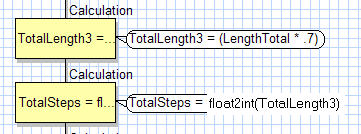
Hi Martin, Thanks! I think I see where my problem is? LengthTotal is an Int, made up from a adding a few variables together. It does not look like I can do what I want and that is to take my float variable TotalLengthFlot = LengthTotal a none float?
[img]
[/img]
Thanks Buddy!
Werner
Re: Is there an easy way to round a floting point number up/
Posted: Sun Nov 20, 2011 1:27 am
by medelec35
Would you like to post your flowchart (pm if u want to keep it private) then I will see if I can get it working the way you want it to.
Martin
Re: Is there an easy way to round a floting point number up/
Posted: Sun Nov 20, 2011 2:20 am
by Spanish_dude
Hi,
There's an int2float function. Try that with your first calculation box (even thought I don't think it will change anything).
What is the value of TotalLength4 ? Is it a point number ?
I'd double check the variable types, just in case you oversaw a wrong type.
Re: Is there an easy way to round a floting point number up/
Posted: Sun Nov 20, 2011 5:28 am
by Werner
Thanks Spanish, Yep that did it! You and Martin had both found it. You Guys are great!!

Have a great day!
Werner