How to connect PC App and Web App together

Discuss PC Developer and Web Developer projects and features here.
Post Reply
stefan.erni
Valued Contributor
Posts: 1248
http://meble-kuchenne.info.pl
Joined: Wed Dec 02, 2020 10:53 am
Has thanked: 231 times
Been thanked: 247 times

How to connect PC App and Web App together

Post by stefan.erni »

Hi Steve

I have two demo programs, and both work well.

I can set up a PC Web server, and I can use the Web App to retrieve text from the matrix server, which works

But when I try to retrieve text with the Web App from the my web server (localhost), it doesn't work yet.
Webserver_FileSystem (1).fcsx
(15.05 KiB) Downloaded 50 times
2026-06-12_17-45-01.PNG
2026-06-12_17-45-01.PNG (24.55 KiB) Viewed 147 times
WebFetchHTML.fcsx
(11.56 KiB) Downloaded 48 times
2026-06-12_17-46-59.PNG
2026-06-12_17-46-59.PNG (12.4 KiB) Viewed 147 times

Steve-Matrix
Matrix Staff
Posts: 1932
Joined: Sat Dec 05, 2020 10:32 am
Has thanked: 287 times
Been thanked: 451 times

Re: How to connect PC App and Web App together

Post by Steve-Matrix »

I've edited your files to show how this could happen.

Some changes I made to the Web Developer app:
  • The DataType is now JSON Encoded
  • The URL is a local IP address as created by the PC Developer app's Network Comms IP Address
  • The ProcessResponse macro extracts the "Data" tag from the received JSON packet
Some changes I made to the PC Developer app:
  • Removed the File I/O component
  • Changed the HTML source to Embedded
  • Added a custom header for CORS and JSON
  • Added the "fetchtest.txt" file with a JSON string
When you simulate the PC Developer app, your firewall will probably ask to allow Flowcode access to your network. You will need to allow it.

You can test to see if the PC Developer web server is active by opening page the following in a browser:

Code: Select all

http://192.168.0.90/fetchtest.txt
It should report the JSON string.

The IP address is likely to be different and is the one specified by the Network Comms IP Address property.

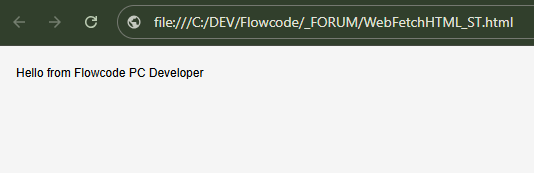
Here are some images showing it working:
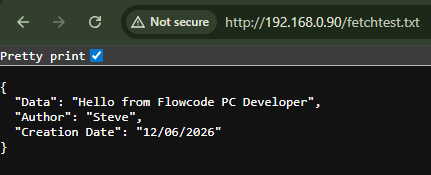
PC Developer webserver test.png
PC Developer webserver test.png (14.09 KiB) Viewed 137 times
Web Developer app.png
Web Developer app.png (10.4 KiB) Viewed 137 times
Attachments
WebFetchHTML_ST.fcweb
(11.31 KiB) Downloaded 27 times
Webserver_FileSystem_ST.fcpcd
(14.33 KiB) Downloaded 26 times

stefan.erni
Valued Contributor
Posts: 1248
Joined: Wed Dec 02, 2020 10:53 am
Has thanked: 231 times
Been thanked: 247 times

Re: How to connect PC App and Web App together

Post by stefan.erni »

Hi Steve

Perfect!

I can use “localhost” instead of the IP address, so I won't have to make any adjustments if it runs on a different computer
2026-06-15_10-01-19.PNG
2026-06-15_10-01-19.PNG (22.75 KiB) Viewed 51 times
2026-06-15_10-06-22.PNG
2026-06-15_10-06-22.PNG (30.17 KiB) Viewed 51 times
And the result from the Web App:
2026-06-15_10-12-46.PNG
2026-06-15_10-12-46.PNG (25 KiB) Viewed 51 times

So, connecting the Web App to the PC App is very easy and user-friendly.

One more question:

Do I always have to do pooling from the Web App, or can I also send data from the PC App?

Steve-Matrix
Matrix Staff
Posts: 1932
Joined: Sat Dec 05, 2020 10:32 am
Has thanked: 287 times
Been thanked: 451 times

Re: How to connect PC App and Web App together

Post by Steve-Matrix »

I think polling if how I'd do it. If you want the Web app to respond to incoming data without polling, then you could look at using MQTT as a way of routing messages between the PC app and the Web app.

Post Reply